The Lachine Canal
Develop the canal for canal tiles, use canal actions and changing effects, and switch from widening to modernization.
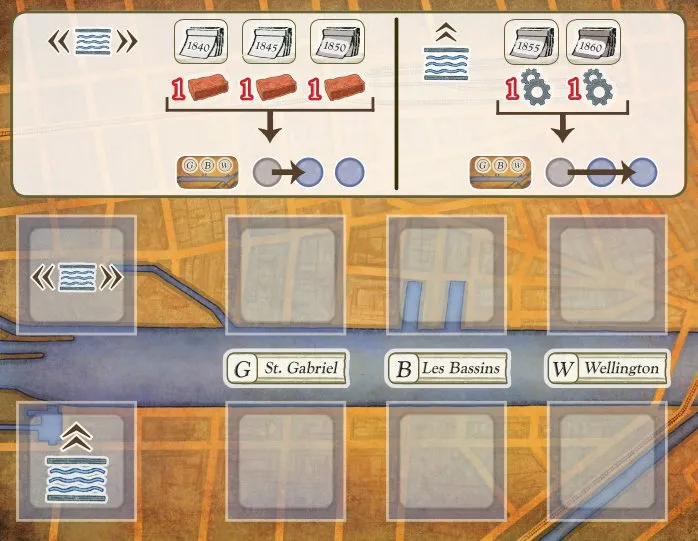
Develop the Lachine Canal
Only in St. Gabriel, Les Bassins or Wellington.
- Pay £1 and spend the era’s good: 1
 in the widening era (1840, 1845, 1850) or 1
 in the modernization era (1855, 1860).
- Take one of the two canal tiles in your current district’s section of the canal tiles board.
- Put it in any slot below your navigation board, empty or on top of an earlier tile; only the top tile of a slot works.
- Move your company board’s canal development marker for that district forward: 1 space (widening) or 2 spaces (modernization).
- Refill the empty space from the matching stack.
- Gain 1
 . In the modernization era, also gain 3
 .
Your canal development markers score at the end: canal development bonus.
Using canal tiles
Canal tiles belong to the spaces of your navigation track, not to the district tiles above them; swapping district tiles does not move them. You may use a new tile in the turn you take it.
| Type | Symbol | When it works |
|---|---|---|
| Canal action (blue) |  | Directly below your boat. One canal action per turn, in addition to your district action. |
| Changing effect (grey), arrow up |  | Directly below your boat, when you take the action it changes. |
| Changing effect, arrows up, left and right |  | Below your boat or the space just left or right of it. The arrows do not wrap round the ends of the track. |
You may use any number of changing effects in a turn, each once.
The tiles are listed one by one under Canal tiles.
The canal phase
Once, after the 1850 development phase, the widening is complete:
- Return the widening tiles on the canal tiles board, and their stack, to the box.
- Draw 6 modernization tiles and place them face up, two in each district section.
From 1855, developing the canal costs a machine, moves your marker 2 spaces and gives 3 prestige. Canallers can now be launched from an upgraded Shipyard.