Taking Turns
The Networks: Primetime turns — the six actions, network card types, producing a show step by step, canceling shows, adding and replacing stars and ads, and passing.
Taking turns
Each round, starting with the holder of the 1st-player token and going clockwise, every player takes exactly one action per turn. Once you pass you take no more turns this round; the round goes on until everyone has passed (p. 7).
[Execs] Some executives change this: Beeb moves around a rondel, Cable may pass straight after an action, Gorilla may take a turn before the 1st player (Executives).
Actions
| Action | What you do |
|---|---|
| Sign a star | Pay the  signing cost of a star in the display and put it in your green room |
| Sign an ad | Take the  cash bonus of an ad in the display and put it in your green room |
| Take a network card | Take one from the display:  immediate cards are used and discarded at once, the rest go to your green room |
| Produce a show | Take a show from the display and put it on the air — see Producing a show |
| Add or replace a star or ad | Attach 1 star or ad from your green room to a show in your lineup — see Adding and replacing |
| Pass | Mark the pass track and take its cash or viewer bonus — see Passing |
Network cards
Network cards bend the rules. Like ads they are free to take unless the card says otherwise. Each has one of four types:
| Type | When it works |
|---|---|
| Immediate | Use it the moment you take it — also when it comes from a genre bonus — then discard it |
 Use once | Once per game, then discard it |
 Ongoing | Any number of times for the rest of the game |
 Game end | Score its viewers at the end of the game |
Using network cards
You may use network cards from your green room at any time during your turn — before, during or after your action, as many as you like. Using one is not an action (FAQ). When a card disagrees with the rulebook, the card wins; specific cards are clarified on Cards and Components.
Producing a show
Taking a show from the display means producing it at once: if you cannot meet all its requirements you cannot take it, and shows never wait in the green room (p. 8). Follow the steps:
- Pay cost — pay the show’s production cost .
- Attach stars and ads — from your green room, fill every required slot; you may also fill optional slots now (FAQ).
- Add to lineup — choose a timeslot, cancel the show already there and put the new show in its place.
- Place season marker — on the timeslot icon (first row) if it is in its preferred timeslot, otherwise on the X (third row).
- Advance on genre track — move up 1 space on the show’s genre track and take any bonus you land on.
A show with only optional slots can be produced with an empty green room — you just pay its cost.
[Execs] Butcher may pay $3M to treat every slot as optional; Flix ignores timeslot penalties; Procrastinator can change a show’s genre while producing it (Executives).
Canceling shows
Whenever a show leaves your lineup:
- Return its season cube to your supply — you may use it again straight away.
- Discard every star and ad attached to it to the public discard area.
- Put the show face up on your reruns pile.
You only cancel a show when a rule forces you to — producing a new show in its timeslot, the cube moving off the bottom row, or failing to pay upkeep. Replacing it can cancel a show in the same round it was produced; its age does not prevent replacement (same-round cancellation). A slot left empty stays empty until you produce a show into it (p. 9).
Adding and replacing stars and ads
As one action, attach one star or ad from your green room to a show in your lineup: either into an empty slot of the right type, or by discarding an attached card of the same type and putting the new one in its place. You may make that replacement on a full show in the same action if the resulting mix still fits its slots (swap on a full show). Discarded cards go to the public discard area (p. 9).
Replacing cards in wild slots
On a show with wild slots you may swap a star for an ad (or the reverse), as long as the show still ends with a set of attachments its slots allow (p. 10).
Passing
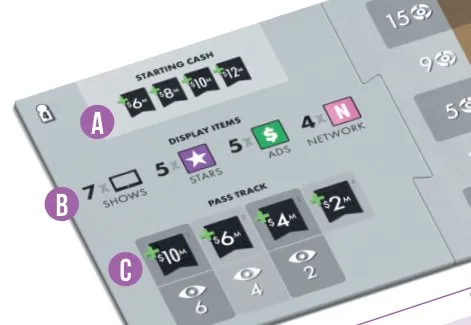
When you pass, put a cube in the leftmost empty column of the pass track and place it on that column’s cash bonus (top: take the cash now) or viewer bonus (bottom: add those viewers to your score at the end of the round). Earlier passers get bigger bonuses.
Passing last
When everyone else has passed, the last player may take any number of actions in any order — including sweeping up the free ads and network cards left in the display. Then they take the last column, which only gives cash.
[Execs] Cable may only take viewers when passing, and nothing when last; Gorilla’s extra turn costs its pass bonus (Executives). [Telly] In Telly Time you also gain $1M per empty square of your genre grid when you pass (Telly Time).