Your Network and Shows
The Networks: Primetime key concepts — the shared boards and display, your lineup, timeslots, green room and reruns, how a show card works, and stars and ads.
The Allplay Primetime edition (2025) of The Networks: four rounds, 1–5 players. Page numbers refer to the Primetime rulebook.
Game boards and display
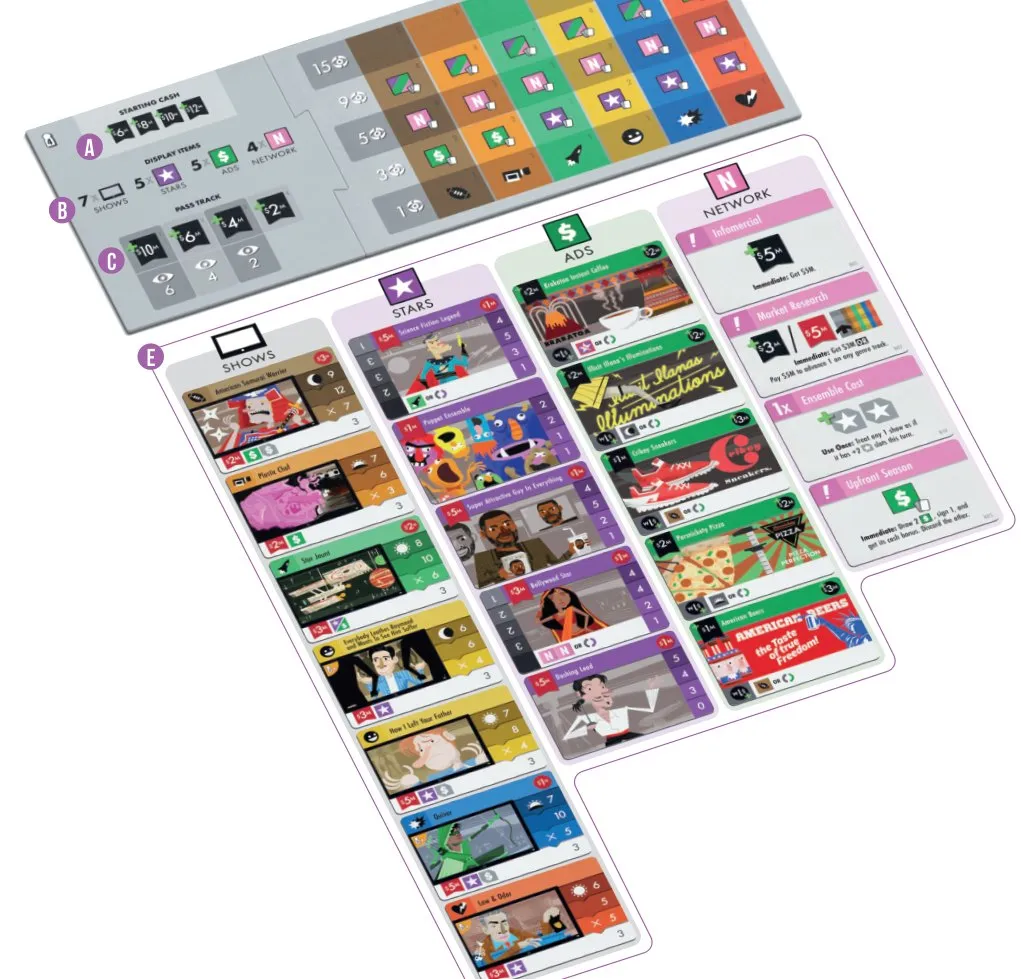
- a Starting cash — what each player starts with, by turn position.
- b Display reference — the faceup cards dealt at the start of each round.
- c Pass track — where you mark passing and take a bonus.
- d Genre tracks — one per genre; you climb them by producing shows.
- e Card display — every show, star, ad and network card on offer this round.
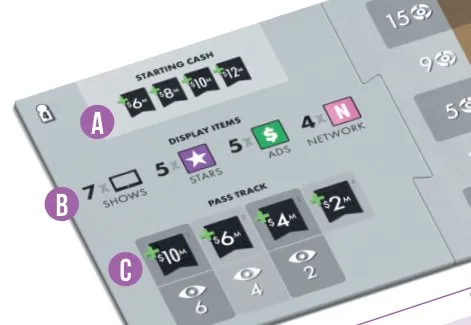
The setup board is double-sided and comes in two pieces, one side per player count (1–2, 3, 4, 5). With 4 players it reads:
| Part | 4 players |
|---|---|
| Starting cash, 1st → 4th player | $6M, $8M, $10M, $12M |
| Display each round | 7 shows, 5 stars, 5 ads, 4 network cards |
| Pass track, 1st → 3rd to pass | $10M or 6  , $6M or 4 , $4M or 2 |
| Pass track, last to pass | $2M only |
Genre tracks
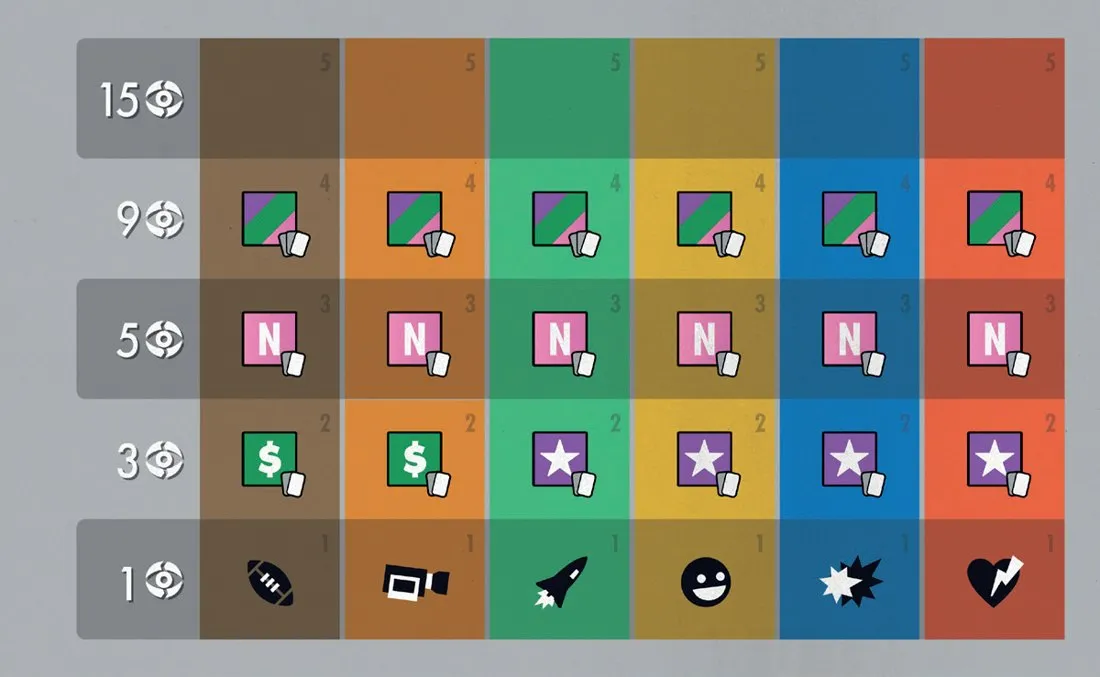
Six genres:  Sports,
 Reality,
 Sci-Fi,
 Sitcom,
 Action and
 Drama. Nobody starts on a track (unless a Pilot Season
show put them there). The first time you produce a show of a genre, put a cube on the bottom space of
its track; each later show of that genre moves the cube up 1. Landing on a bonus gives it at once;
beyond the top space nothing more happens, and several players may share a space.
| Space | Bonus and end-game viewers |
|---|---|
| 1 | No bonus; 1 viewer at game end |
| 2 |  for Sports and Reality,  for the other four genres; 3 viewers at game end |
| 3 |  ; 5 viewers at game end |
| 4 |  ; 9 viewers at game end |
| 5 | No bonus; 15 viewers at game end |
| Bonus | What you do |
|---|---|
| Star | Draw 2 stars, sign 1 for free, discard the other |
| Ad | Draw 2 ads, sign 1 and take its cash bonus, discard the other |
| Network | Draw 2 network cards, keep 1, discard the other |
| Wild | Draw 1 star, 1 ad and 1 network card; keep one of them (star free, ad with its bonus), discard the rest |
Draws come from the top of the decks, never from the display, and what you keep goes to your green room (FAQ).
[Moguls] With Moguls, a mogul token sits on space 3 of every track and the first player to land there may take a mogul instead of the network bonus (Moguls). [Telly] Telly Time replaces the genre board with each player’s genre grid (Telly Time).
Card display
Anyone may look at any card in the display at any time. Cards taken during a round are not replaced; at the end of the round the leftovers are discarded and a full new display is dealt (p. 4).
Your network
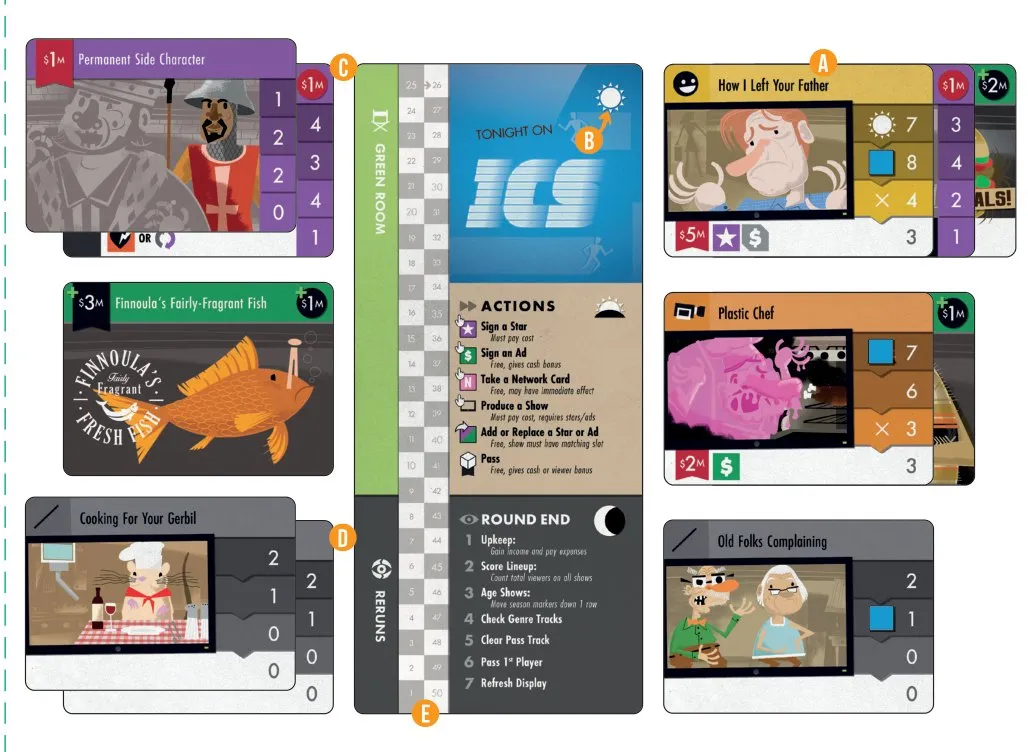
- a Lineup — your three shows on the air.
- b Timeslots — daytime, primetime and late night.
- c Green room — your signed cards waiting to be used.
- d Reruns — your canceled shows.
- e Round scoring track — an optional counter.
Lineup
The shows to the right of your board are on the air. Each timeslot holds exactly one show. A new show must go into a timeslot, and the show already there is canceled. You start with three starter shows (or Pilot Season shows) in it.
Timeslots
Your three timeslots are  daytime,
 primetime and
 late night. Any show may go in any slot, but each show has a preferred timeslot where it scores
more (see Preferred timeslots). Starter shows have no preference.
[Telly] Telly Time adds a fourth  weekend timeslot
(Telly Time).
Green room
Stars, ads and network cards you take go to your green room, left of your board. It has no limit and cards may wait there all game. Cards in the green room earn no income and pay no expenses.
Reruns
Canceled shows go face up to your reruns pile. At game end each scores the viewers on its bottom row. Reruns are public.
Round scoring track
An optional aid on the player board for adding up this round’s viewers. It is not your score — that goes on the scoreboard — so reset it to 0 after recording each round.
Shows
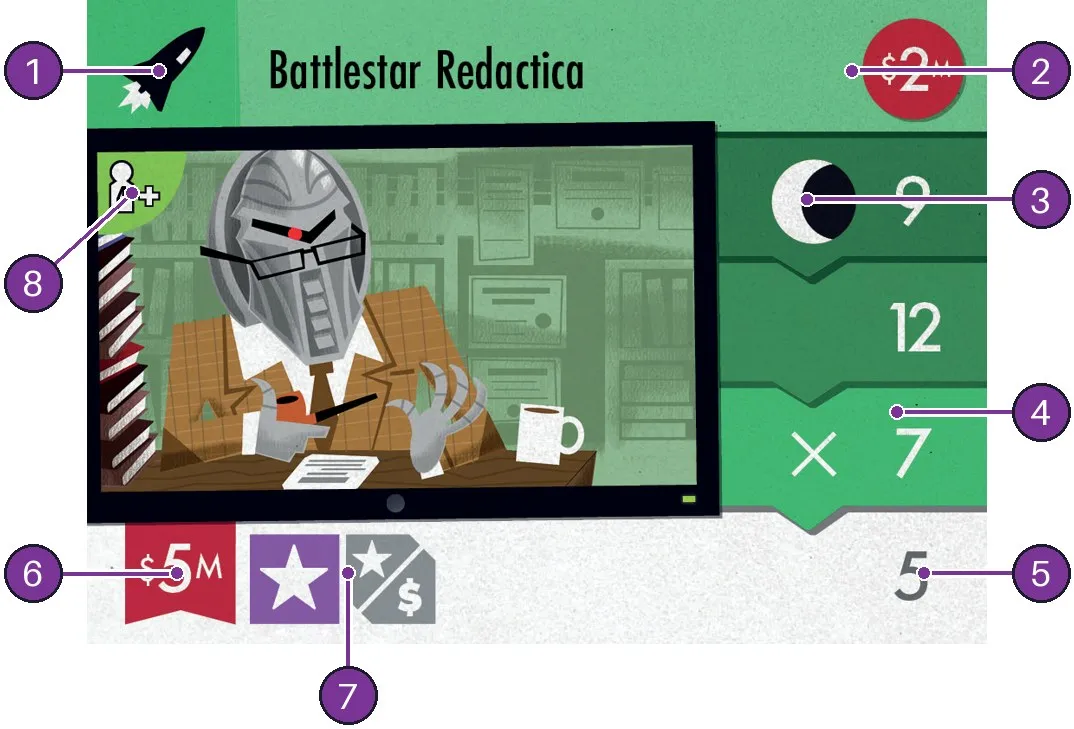
- Genre — which genre track the show advances.
- Expenses
 — what it costs at every upkeep while on the air.
- Preferred timeslot — the icon on the season track’s top row.
- Season track — the viewers it scores each round, row by row (Seasons and viewers).
- Bottom row — its last season, and its value as a rerun.
- Production cost
 — what you pay to produce it.
- Attachment slots — how many stars and ads it can hold (Attachment slots).
- Player count — shows marked 3+ or 4+ are removed with fewer players (setup).
Seasons and viewers
A cube on the season track marks the row the show scores at the end of this round. After scoring, every show’s cube moves down one row; a cube that moves off the bottom row cancels the show (p. 6, p. 10).
Preferred timeslots
Placed in its preferred timeslot, a new show’s cube starts on the first row, covering the timeslot icon. In any other timeslot it suffers a timeslot penalty: the cube starts on the third row, on the X — the show skips its best seasons and has only two rounds left.
Stars and ads
Signing stars
Pay the signing cost in a star’s top left to sign it from the display; without the cash
you cannot. An effect that signs a star “for free” ignores the cost.
Signing ads
Ads have a  cash bonus in the top left instead of a cost: sign one and take that cash from
the supply. You can always sign an ad on your turn.
Attachment slots
Stars and ads score or earn only when attached to a show in your lineup. Slide the card behind the show so its viewers and income or expenses show on the right. One card per slot:
| Slot | Meaning |
|---|---|
  Coloured | Required — must be filled when you produce the show |
  Gray | Optional — fill when producing, or later with Add or Replace |
  Split | Wild — holds 1 star or 1 ad |
The slots are also the maximum a show can hold (FAQ). A show with no star slot can never take a star unless an effect says so (FAQ).
Conditions, promo ads and printed effects are on Conditions and Effects.