Teach the Game
A script to teach SETI at the table — how you win, the boards, a round, the end, every way to score and what each resource is for.
How you win
“Each of us runs a space agency hunting for alien life. Over five rounds — two to three hours — we launch probes to the planets, point telescopes at nearby stars and crunch the data we collect. Every find is a life trace; three different traces under one hidden alien board reveal that species, and then everyone can study it. Whoever ends with the most
victory points wins.”
What you need, and how you get it:

 Life traces — 5 points and a
publicity each on the discovery spaces, more on the alien boards later. Yellow comes mostly from
 landing, purple from winning sectors with
 signals, blue from
 analyzing data.
- Cards — projects that score, missions that reward you, and end-of-game cards.
- Gold scoring tiles — the big end-game multipliers you claim at 25, 50 and 70 points.
The loop: collect resources → spend them on one action per turn → turn the results into traces, points and a bigger income for the next round.
The boards
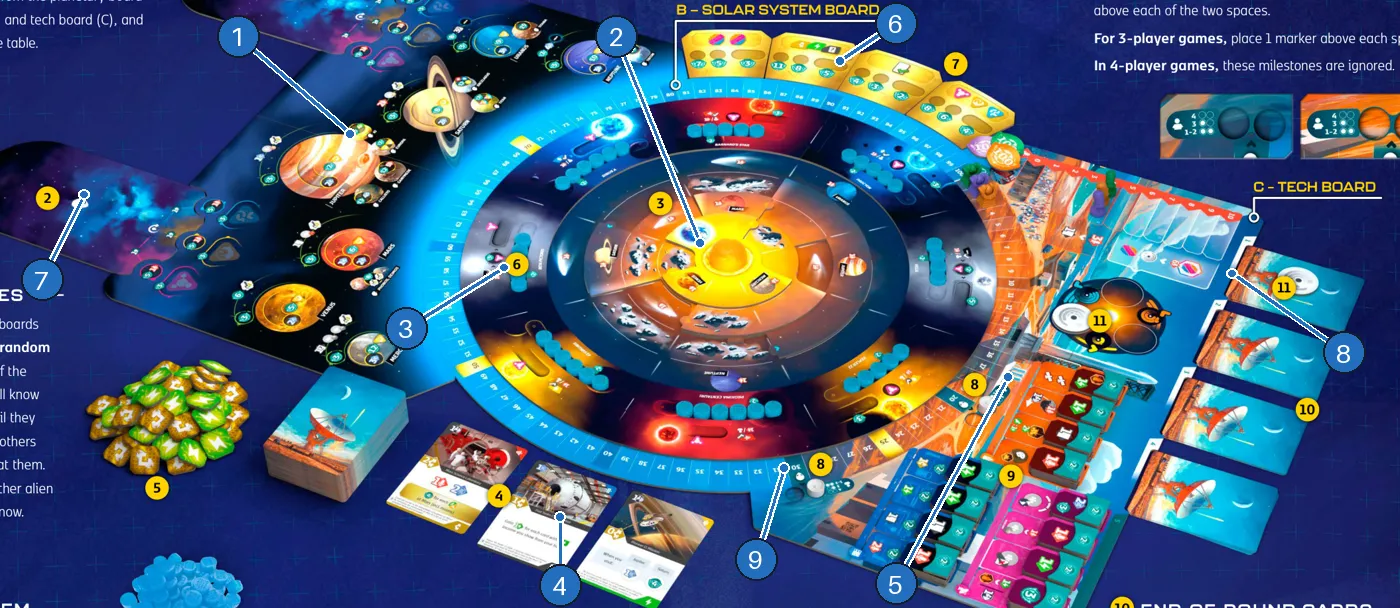
- Planetary board — the planets you orbit and land on, with their rewards.
- Solar system — three rotating discs where your probes fly.
- Nearby stars and sectors — eight star systems whose data you collect by marking signals.
- Card row — three face-up cards you can take or discard for signals.
- Tech board — 12 technologies in three colours.
- Gold scoring tiles — four end-game tiles you claim at milestones.
- Alien species — two face-down species with their discovery spaces.
- End-of-round cards — the earlier you pass, the more you choose from.
- Scoring track — with the gold and neutral milestones.
Your own player board:
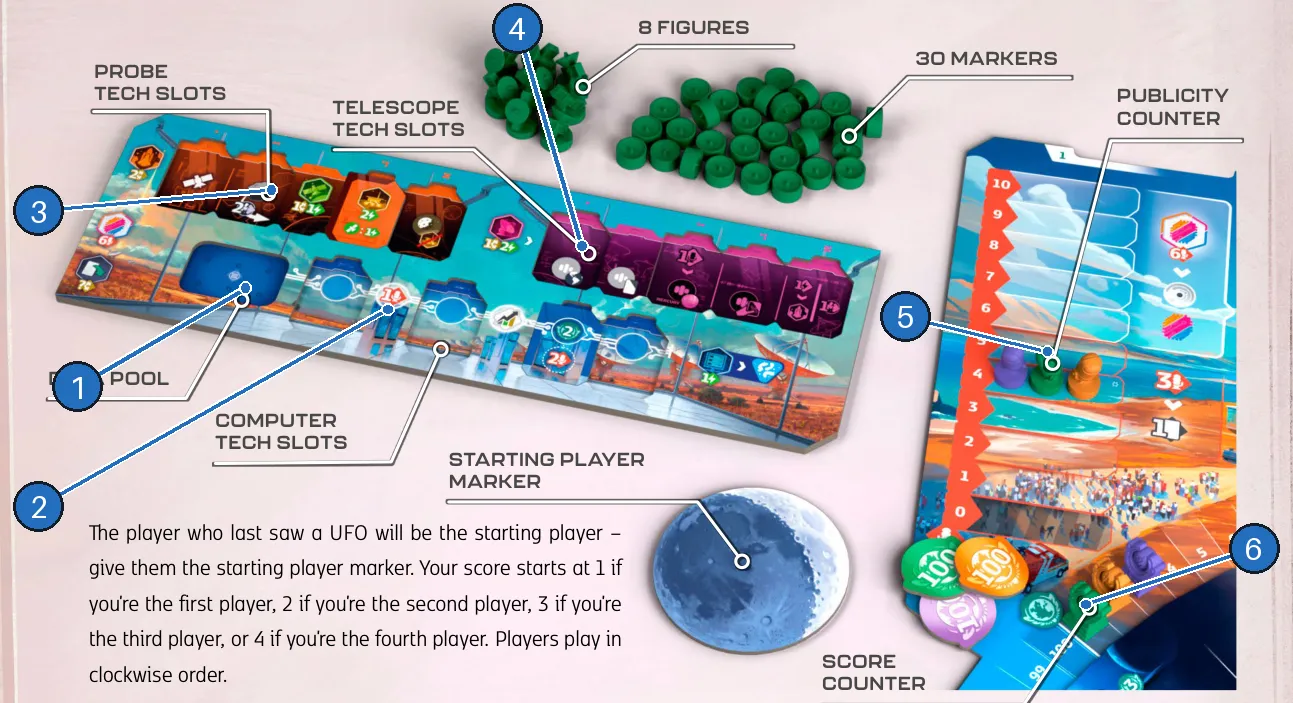
- Data pool — up to 6 data waiting to go into the computer.
- Computer — fill its top row, then analyze; computer techs extend it.
- Probe tech slots — improve your probes.
- Telescope tech slots — improve your scans.
- Publicity counter — 0 to 10, spent on techs and cards.
- Score counter — triggers milestones as it passes them.
A round
-
The starting player takes the first turn; then clockwise, skipping players who passed.
-
On your turn, one main action (all printed on your board), plus any number of free actions before, during or after it — see Your turn:
Main action Cost What it does  Launch a probe
2 
A probe on Earth (limit: 1 probe in space).  Orbit
1 + 1 
Probe at a planet becomes an orbiter: planet’s orbit rewards, usually income.  Land
3 (2 if an orbiter is there)Probe becomes a lander: a trace, points, data for the first. Scan
1 + 2 Mark signals in Earth’s sector and a card-row sector, plus telescope techs. Analyze data1 Full computer top row → clear it, mark a trace. Play a card
its cost Resolve the card’s white effect.  Research a tech
6 
Rotate the solar system, take a tech and its bonus.  Pass
— Discard to 4, first passer rotates, take an end-of-round card. -
After your turn, resolve milestones, then any discovered species.
-
When everyone has passed: everyone takes income, the starting player marker moves left, the rotation reminder moves to the next stack. See Between rounds.
How the game ends
After round 5 (or round 5 of the four-round [Agencies] game — see Space Agencies). Then score end-of-game cards, gold scoring tiles and any alien scoring step. Most points wins; a tie stays a tie. Full details in End of game.
Ways to score
| Source | How and when |
|---|---|
| Starting score | 1, 2, 3 or 4 points by turn order. |
 First orbiter at a planet | 3 points, plus the planet’s orbit rewards. |
| Landing | Points printed on the planet (or moon); the first lander also gets data. |
| Life traces | 5 points + 1 publicity on a discovery space; 3 points on an overflow space; printed rewards on the alien boards. |
| Signals | 2 points for the marker in a sector’s second data space; winning a sector gives its star’s reward. |
| Computer | 2 points for each data placed in a computer tech’s upper space. |
| Techs | 2 points for the first tile taken from each stack. |
| Cards | Card effects, mission rewards and end-of-game scoring cards. |
 Gold scoring tiles | At the end: your marked value × the number of sets you have. |
| Aliens | Each species adds its own points — Exertian danger can lose a tenth of your score. |
| [Agencies] Organizations | Organization powers and the new species (Space Agencies). |
What each resource is for
| Resource | Why you need it | How you get it | How you use it |
|---|---|---|---|
| Credits | Most actions and cards cost them | Income, planet rewards, card corners, exchange | Launch, orbit, scan, play cards |
| Energy | Movement, landing, scanning | Income, rewards, exchange | 1 energy = 1 move; land, scan, analyze |
 Cards | Flexible: action, income, signal or free action | 5 at start, income, rewards, end-of-round cards, 3 publicity | Play, tuck for income, discard for the corner or a signal |
| Publicity | Techs and extra cards | Visiting planets and comets, sectors, discovery spaces, data | 6 for a tech, 3 for a card; maximum 10 |
 Data | Fuels the computer | Marking signals, landing first, rewards | Place in the computer for rewards; analyze for a blue trace |
 Techs | Permanent upgrades | Research (6 publicity) or cards | Better probes, scans and computer |
| Probes | Reach planets | Launch from Earth | Orbit or land; visit for publicity |
 Income | Resources every round | Tuck cards (start, computer, rewards) | Paid at the start of rounds 2–5 |
Teaching tips
- Teach the player board left to right: every main action and its cost is printed there.
- Don’t read the alien rule sheets in advance — read a species only when it is discovered.
- Show one solar system rotation before the first turn: probes move with the discs and can be pushed.
- Stress the timing rules: free actions only on your own turn, milestones between turns.
Rehearse passing
Pretend you are the first player to pass in round 1 and hold six cards. Finish any free actions first. Then discard down to four cards, rotate the solar system, and choose an end-of-round card, in that order. The new card does not force another hand-limit discard. Other players keep taking turns until they also pass.
Ask: ‘Can I use a free action after seeing the pass rotation?’ No: free actions stop before the pass-resolution steps begin.