Signals, Sectors and Data
Scanning nearby stars, marking signals, completing, winning and resetting sectors, the data pool, the computer and the Analyze Data action.
Scan nearby stars
 Pay 1
 + 2
 to listen with Earth’s telescopes. No
probe is needed. Do these steps, as shown on your board, in any order:
 Mark 1 signal in the sector with Earth.
 Discard 1 card from the card row and mark 1 signal in one of the two
sectors of that card’s colour (top-right corner). Refill the row after the whole scan.
- Activate any telescope techs you own, in any order, paying their extra costs.
A scan always marks at least 2 signals; with techs, up to 4.
[Agencies] Each signal token you discard during a scan lets you discard one more card from the row and mark its signal — at most two per scan, since the row is refilled only afterwards (Signal tokens).
Marking signals
To mark a signal in a sector, take the leftmost data token from that sector’s data slot into
your data pool and put one of your markers in its place. Signals come from scans and from many
cards ( any sector,
 a sector of that colour).
- A marker placed on the second space of a data slot scores 2 points at once.
- Marking is mandatory and always possible: when the slot is full you add an excess marker, with no data, which still counts for winning the sector.
- No markers left? Use any substitute — the supply is unlimited.
Sectors
The board is split into 8 sectors, each lined up with one nearby star system holding a data slot. “The sector with Earth” (or with any planet) means the star currently aligned with that planet’s position — which changes as the system rotates.
Completing a sector
Taking the last data from a slot completes the sector. Completed sectors are resolved when you finish your main action, in any order you choose.
Winning a sector
- The player with the most markers in the slot wins; a tie goes to whoever marked later.
- The winner places a marker on the space beside the star and gains its reward (
 ).
Some stars give the first winner a better reward (often a
 purple trace) and
later winners a lesser one.
- Everyone who has a marker there, winner included, gains 1
 .
Resetting the sector
The second-placed player (same tie-break) leaves one marker on the first space of the slot. All other markers go back to their owners and the empty spaces refill with data, as at setup. The sector can be completed and won again. If all markers belonged to one player there is no second place and the slot refills completely.
Data
Data pool
Data you gain goes into your data pool on the left of your board: at most 6. Excess data is discarded.
Your computer
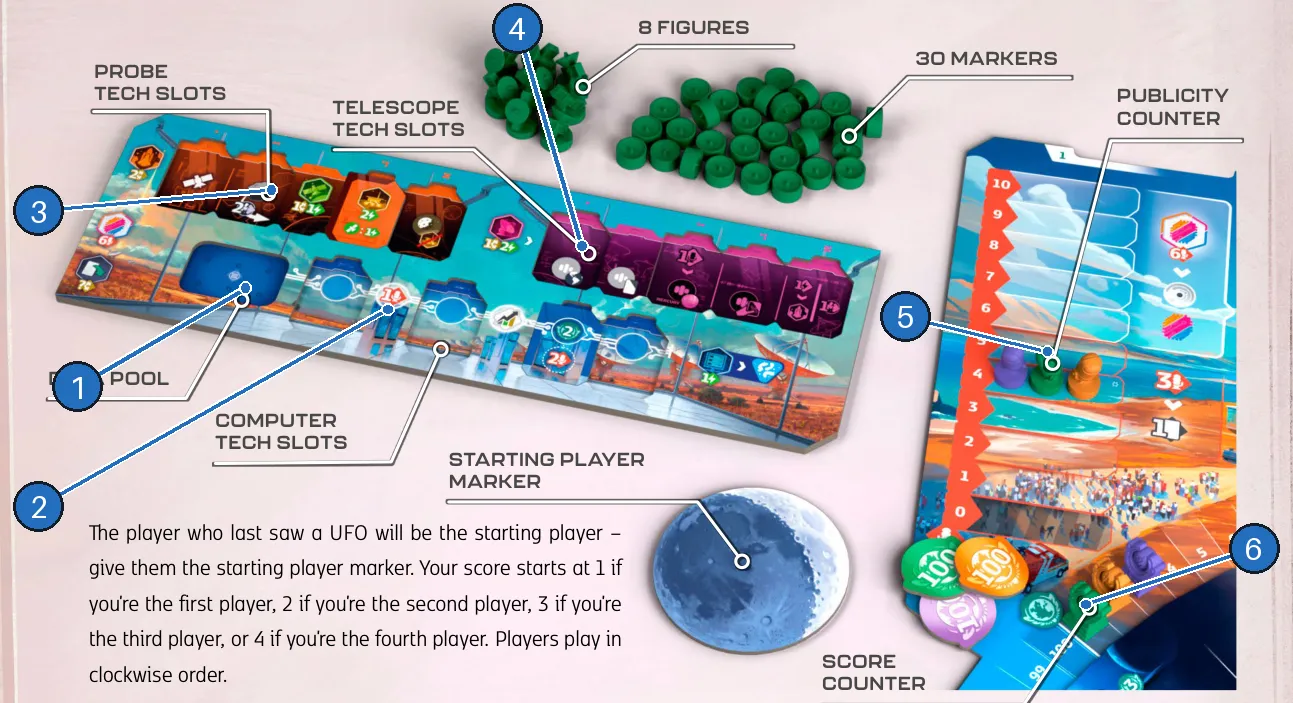
- Data pool — holds up to 6 data.
- Computer — six top-row spaces, then computer techs.
- Probe tech slots.
- Telescope tech slots.
- Publicity counter.
- Score counter.
As a free action on your turn, move a  data token from the pool into the computer,
filling the top row left to right. When data covers a printed reward, gain it at once:
- the second space gives 1 ;
- the fourth space gives an
 income increase;
- a computer tech replaces a space with an upper space (2 points) and an optional lower space (its reward). Lower spaces fill in any order, but only under a filled upper space.
You may place as much data per turn as you like, but only on your turn.
Analyze data
 Pay 1 when the computer’s top row is full (lower tech
spaces may be empty). Remove all data from the computer — keep the data in your pool — and mark a
 blue life trace for one of the two species. The computer is empty and ready
to fill again.
[Agencies] Deep Sky Survey analyzes for no energy (Organizations).