Solo: Andrew Carnegie
Playing Carnegie alone against Andrew Carnegie: setup and difficulty, reading his action cards, the five steps of a solo round and how Andrew scores.
Andrew Carnegie himself is your opponent — and a tough one. You play your Company by the normal 2-player rules; Andrew uses only disks and a deck of action cards. The setup changes are in the setup checklist (choose 1 player).
Setup
- Set up as a 2-player game, with the 18 neutral disks.
- Andrew has no Company board, employees, VP track disk, money, goods or study points: he always has enough of everything. He places no Housing disk and reserves no Department at setup.
- He puts a disk on the first space of each transportation track.
- Lay his victory-point cards 0, 1, 3, 6, 10 left to right.
- Build his deck of 20 action cards by difficulty:
| Difficulty | Normal cards | Advanced cards (”?” back) |
|---|---|---|
| Beginner | 20 | 0 |
| Normal | 15 | 5 |
| Difficult | 10 | 10 |
| Expert | 5 | 15 |
- The locomotive starts at the top left of the 0 VP card: you choose the first action.
Andrew’s action cards
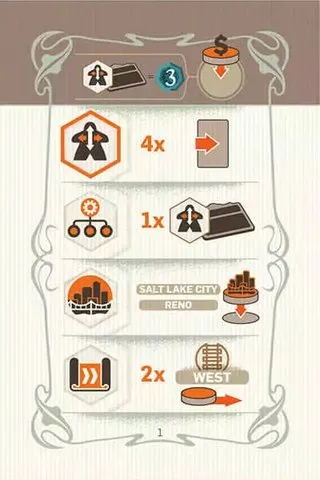
Each card shows, top to bottom:
- Donation — the space Andrew takes when a donation event comes up.
 Human Resources — how many spaces the card slides right along his VP cards.
 Management — how many Department tiles of which type he takes.
 Construction — the cities where he builds.
 R&D — how many spaces he advances in which region.
The action ringed in orange is the one Andrew chooses on his turns. A normal card’s back shows that action too; an advanced card’s back shows a ”?”. Every card is listed in Cards & Components.
A round against Andrew
You and Andrew take turns choosing the action: when the locomotive is at the top left of the 0 VP card you choose; at the top right (over Andrew’s portrait) he does. Move it at the end of every round.
New action card
Draw Andrew’s top card and put it face down under the 0 VP card without looking.
Choice of action
- Your choice: place the Timeline marker on any row as usual.
- Andrew’s choice: turn the card face up; he takes the row of the ringed action. If that row has reached its End, he turns over a marker below exactly as a player would (End rule).
Andrew’s turn
Andrew always acts first. Turn his card face up if it isn’t yet.
- Event — income: nothing happens for him.
- Event — donation: he puts a disk on the donation space at the top of his card. If it is taken (or he has no disks left), slide his card one space right instead.
- Action — the chosen action, with the card’s values:
- Human Resources: slide the card right by the number shown.
- Management: take the number of Department tiles shown of the type shown,
lowest number first. For each one missing, slide the card one space right.
- Construction: put a disk on the leftmost free space of each named city.
For each disk that can’t be placed, slide the card one space right.
- R&D: move his disk in the named region right by the number shown. For each step
he can’t make, slide the card one space right.
The card never moves past the 10 VP card.
Your turn
Resolve the event (income and/or donation) and use your Departments as in the normal game.
End of round
Stand up employees, move the action marker, then turn Andrew’s card face down under the VP card it reached (the 0 VP card if it didn’t move). Move the locomotive to the other side.
Andrew’s score
- Each action card scores the VP card it lies under.
- 2 VP per Department tile he took.
- 6 VP per transport disk on the last space of a track (no connection points).
- Each construction disk scores its city (0–3 VP).
- His donations score on your Company: if he holds “2 VP per project in the West” and you built 5 there, he scores 10. His 12 VP limit per donation stays fixed, whatever your tabs reveal.
The higher score wins.