Every Carnegie component with a picture and what it does: board, Company board, the 40 solo action cards and 5 VP cards, all 32 Department tiles, Timeline tiles, project tabs, Action Choice tiles, New Donation tiles, pieces and icons.
Every distinct face, grouped by type, with a link to the rule that uses it. The board, Company
board, Department tiles, Timeline tiles, project tabs, solo cards and expansion tiles are pictured
from the Carnegie Tabletop Simulator mod
(final graphics, published with Quined Games’ permission); the pieces and icons come from the
publisher’s rulebook. Effects are in our own words.
Boards
Picture
Board
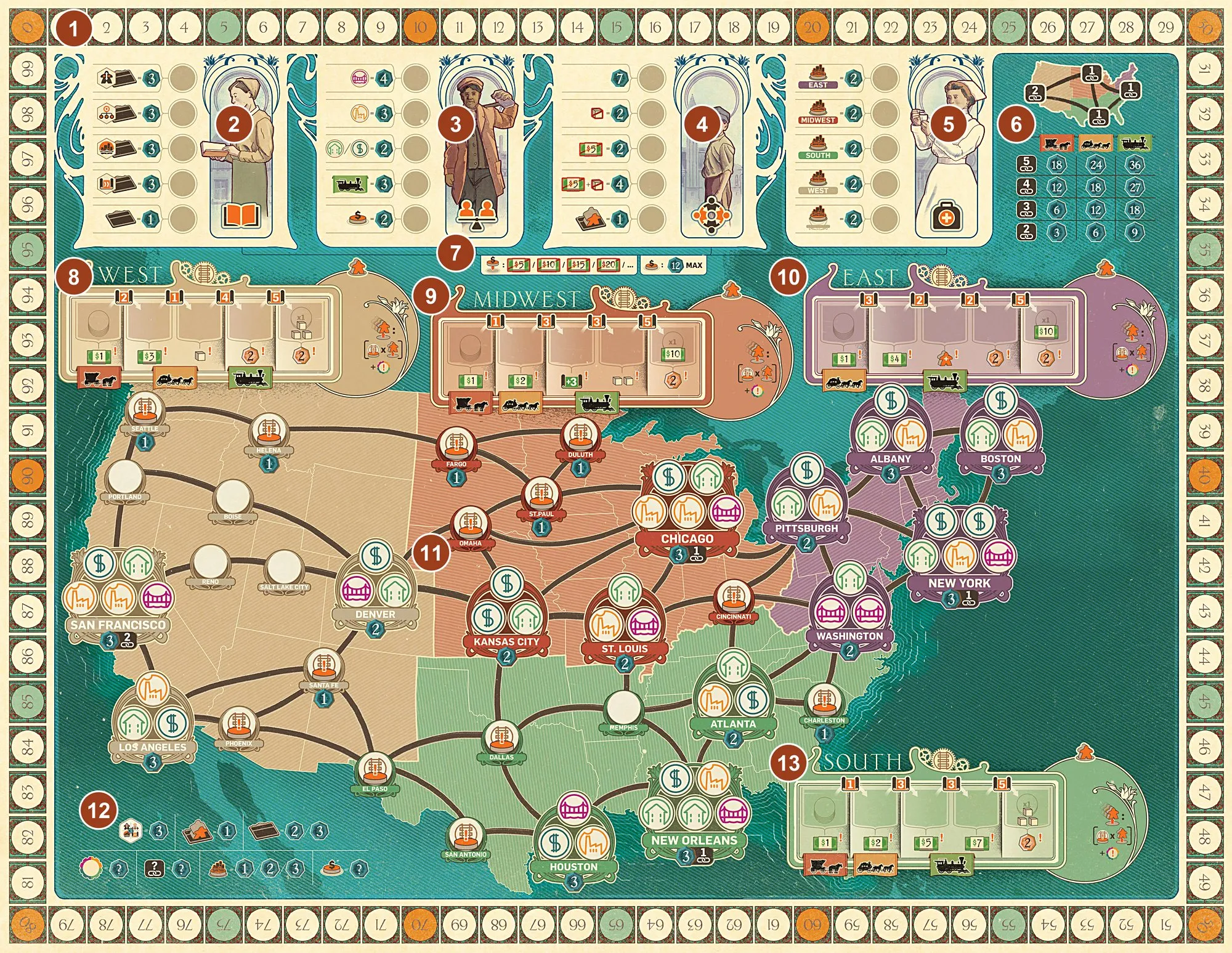
Game board — score track, donation chart, connection table, the four regions with their Mission areas and transportation tracks, and the map of cities (numbered tour). A Take Income event pays only the transport income shown under your disk; a small-city income symbol does not also pay project-tab income (FAQ). The $10 or 3-cube bonus on a track is paid only when you reach its last space; later income there is the printed 2 VP (FAQ). Donation costs rise by $5 each time without a cap: for example, donation five costs $25 (FAQ). A network uses its slowest connected region’s transport level, counts each major city once, and scores only its better route if you have two separate networks (FAQ, FAQ, FAQ).
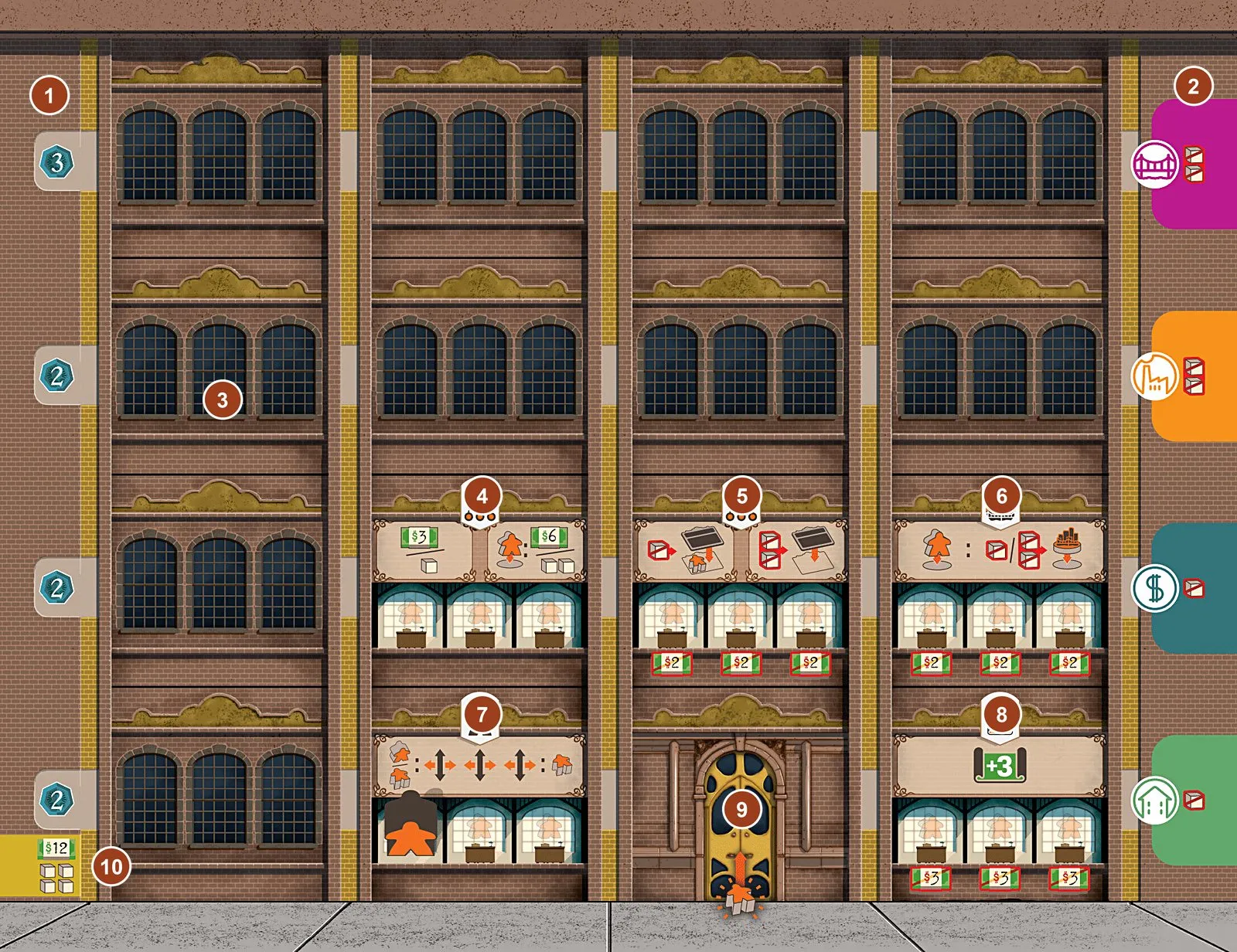
Company board (4, one per colour) — Lobby, 5 starting Departments, 11 empty building spaces, VP per row and the project-tab slots (numbered tour, your Company).
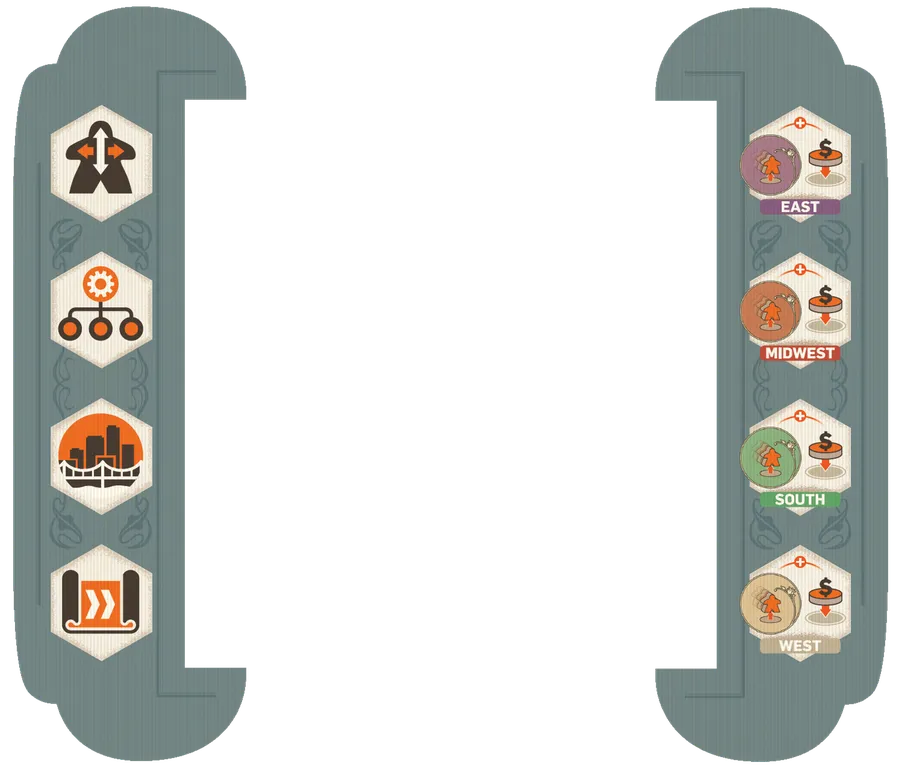
Start and End tiles — frame the four Timeline tiles; the Start tile holds the action markers (Timeline). When an action marker is already at End, choosing its row flips the marker in the row below; the next space on that row supplies the event, then the flipped marker turns back and advances at round end. At a final space, take income and donate in either order before the next player acts (FAQ, FAQ).
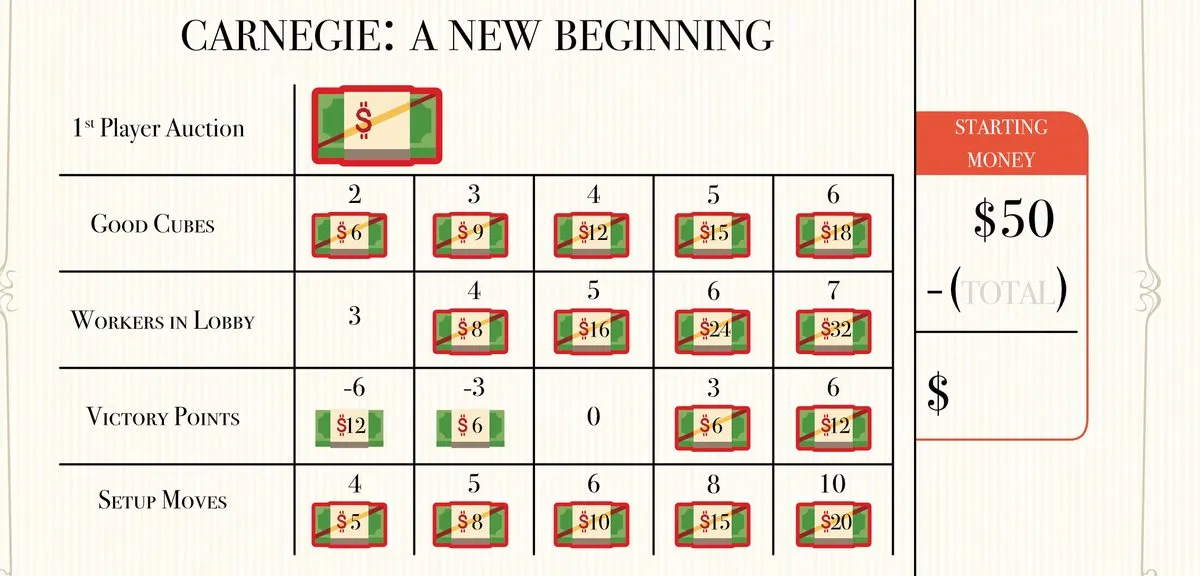
[D&D] A New Beginning sheet — the bidding notepad (A New Beginning, FAQ, FAQ). The highest first-player bid pays their bid; any negative starting VP is subtracted from your final score.
Cards
Solo victory-point cards
Picture
Card
0 VP — Andrew’s portrait card; the locomotive sits on its left (your choice) or right (Andrew’s choice) (solo round). Andrew’s donation limit stays at 12 VP even when your tabs raise yours (FAQ).
1 VP — action cards under it score 1 VP each.
3 VP — 3 VP per card under it.
6 VP — 6 VP per card under it.
10 VP — 10 VP per card under it; cards never slide further.
Solo action cards
Andrew’s 40 action cards: 20 normal and 20 advanced (”?” on the back). Each lists his donation
space, then one line per action; the orange-ringed action is his choice
(how to read them). In 2–3 player games the same cards place the
neutral disks (donation line and Construction cities). In Management, Andrew takes one Department
per turn, though he may take the same Department in a later round (FAQ);
resolve his Welfare donation after your score, using resources left (FAQ).
Normal cards
Picture
Card
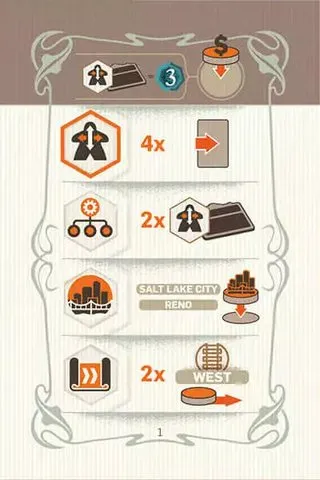
Normal 1. Donation: Education — 3 VP per Human Resources Department. Chooses Human Resources. HR: slide 4 · Management: 1 Human Resources · Construction: Salt Lake City, Reno · R&D: 2 West.
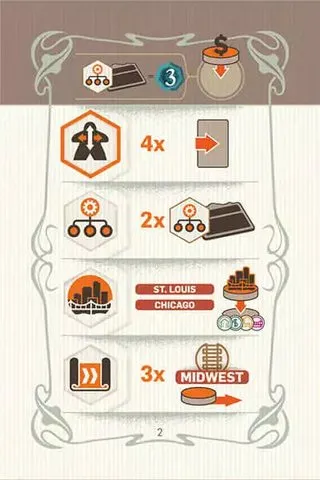
Normal 2. Donation: Education — 3 VP per Management Department. Chooses Human Resources. HR: slide 4 · Management: 1 Management · Construction: St. Louis, Chicago · R&D: 1 Midwest.
Normal 3. Donation: Education — 3 VP per Construction Department. Chooses Human Resources. HR: slide 3 · Management: 1 Construction · Construction: Boston, Washington · R&D: 2 East.
Normal 4. Donation: Education — 3 VP per R&D Department. Chooses Human Resources. HR: slide 3 · Management: 2 R&D · Construction: New Orleans, Houston · R&D: 2 South.
Normal 5. Donation: Health — 2 VP per project in the Midwest. Chooses Human Resources. HR: slide 3 · Management: 1 Human Resources · Construction: San Francisco, Santa Fe · R&D: 1 West.
Normal 6. Donation: Education — 1 VP per Department. Chooses Management. HR: slide 2 · Management: 3 Human Resources · Construction: San Francisco, Los Angeles · R&D: 1 West.
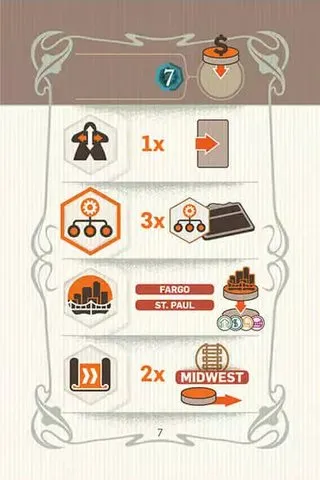
Normal 7. Donation: Welfare — 7 VP. Chooses Management. HR: slide 1 · Management: 3 Management · Construction: Fargo, St. Paul · R&D: 2 Midwest.
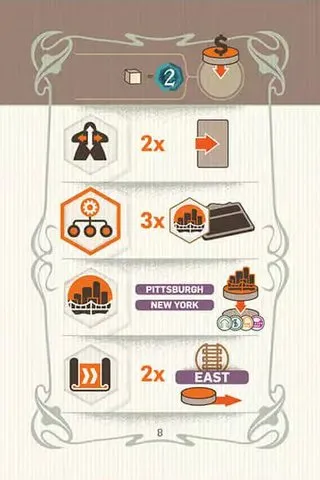
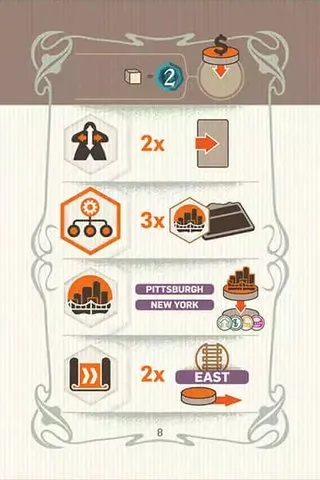
Normal 8. Donation: Welfare — 1 goods cube for 2 VP. Chooses Management. HR: slide 2 · Management: 3 Construction · Construction: Pittsburgh, New York · R&D: 2 East.
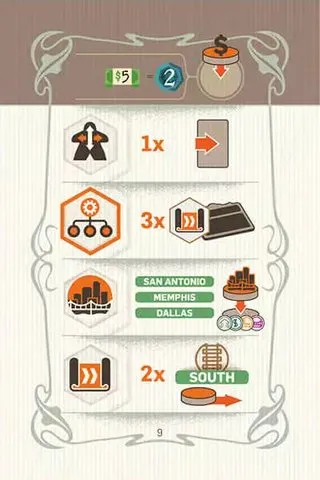
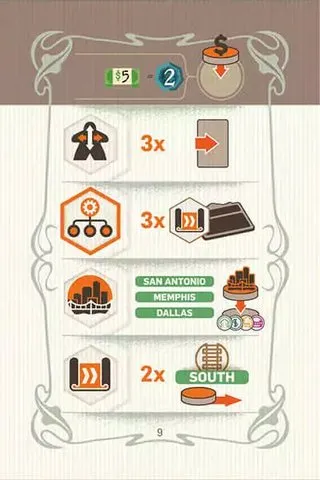
Normal 9. Donation: Welfare — $5 for 2 VP. Chooses Management. HR: slide 1 · Management: 3 R&D · Construction: San Antonio, Memphis, Dallas · R&D: 2 South.
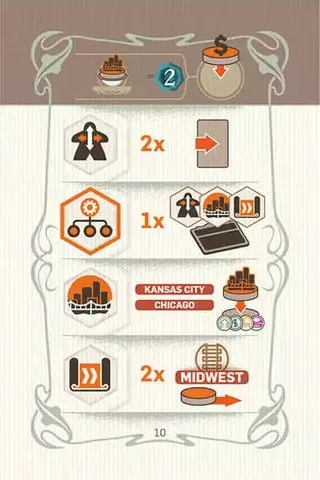
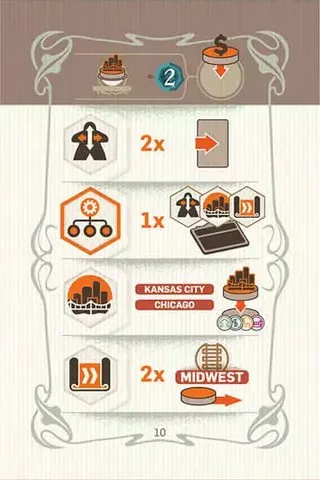
Normal 10. Donation: Health — 2 VP per project in a small city. Chooses Management. HR: slide 2 · Management: 1 each of Human Resources, Construction and R&D · Construction: Kansas City, Chicago · R&D: 2 Midwest. Check against the physical component: three type icons over one tile.
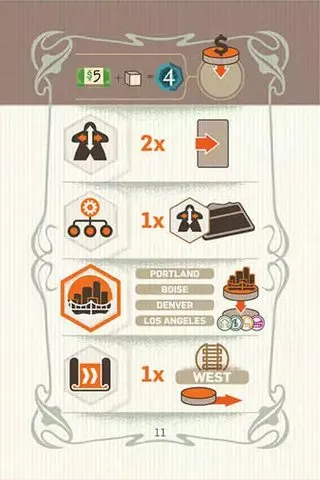
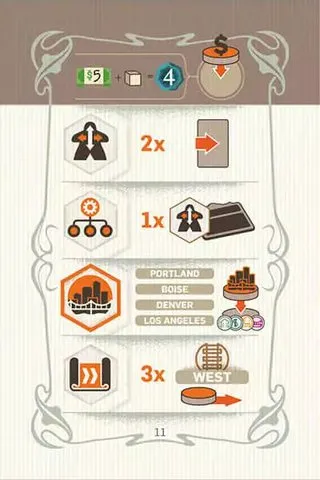
Normal 11. Donation: Welfare — $5 + 1 goods cube for 4 VP. Chooses Construction. HR: slide 2 · Management: 1 Human Resources · Construction: Portland, Boise, Denver, Los Angeles · R&D: 1 West.
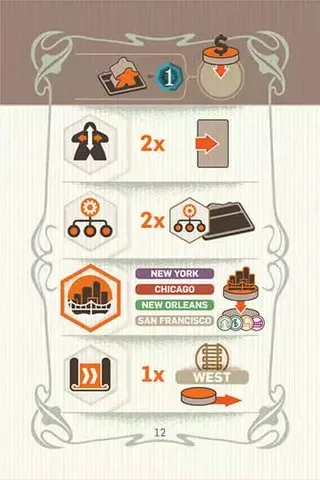
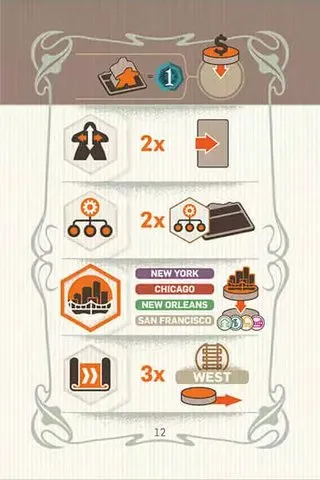
Normal 12. Donation: Welfare — 1 VP per standing employee. Chooses Construction. HR: slide 2 · Management: 2 Management · Construction: New York, Chicago, New Orleans, San Francisco · R&D: 1 West.
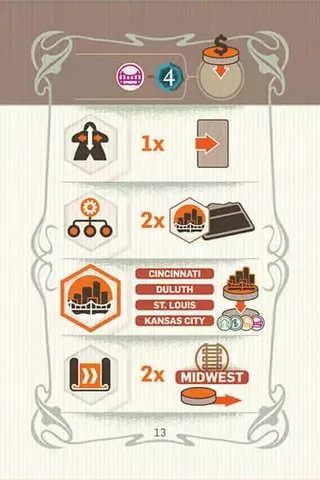
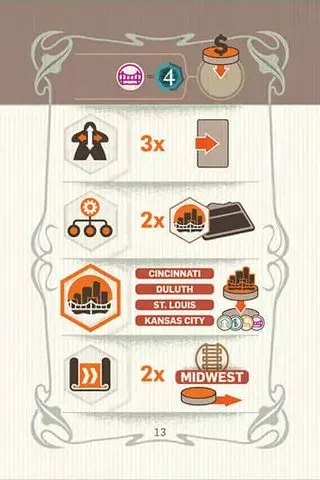
Normal 13. Donation: Human Rights — 4 VP per Public Infrastructure project. Chooses Construction. HR: slide 1 · Management: 2 Construction · Construction: Cincinnati, Duluth, St. Louis, Kansas City · R&D: 2 Midwest.
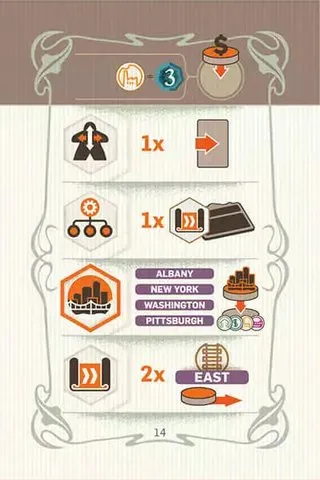
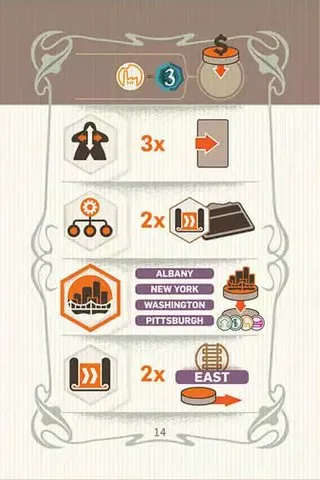
Normal 14. Donation: Human Rights — 3 VP per Industry project. Chooses Construction. HR: slide 1 · Management: 1 R&D · Construction: Albany, New York, Washington, Pittsburgh · R&D: 2 East.
Normal 15. Donation: Health — 2 VP per project in the South. Chooses Construction. HR: slide 2 · Management: 1 Construction · Construction: New Orleans, Atlanta, Houston, Charleston · R&D: 2 South.
Normal 16. Donation: Human Rights — 2 VP per Housing and Commerce project. Chooses R&D. HR: slide 2 · Management: 2 Human Resources · Construction: New Orleans, Atlanta · R&D: 3 South.
Normal 17. Donation: Human Rights — 3 VP per Railroad region. Chooses R&D. HR: slide 1 · Management: 2 Management · Construction: Boston, New York · R&D: 3 East.
Normal 18. Donation: Human Rights — 2 VP per donation. Chooses R&D. HR: slide 2 · Management: 1 Construction · Construction: Chicago, Omaha · R&D: 3 Midwest.
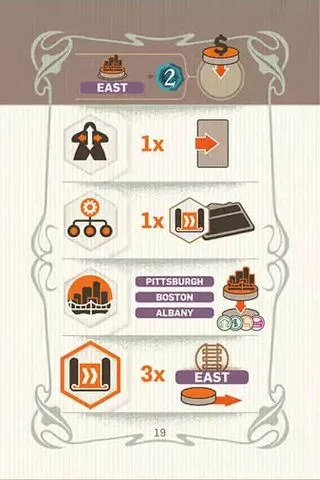
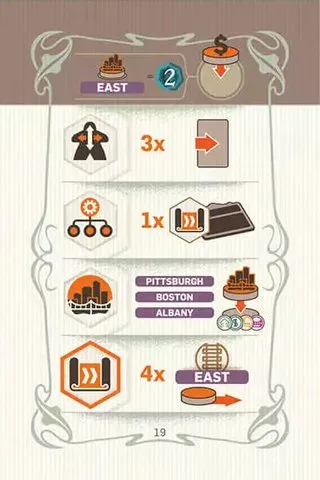
Normal 19. Donation: Health — 2 VP per project in the East. Chooses R&D. HR: slide 1 · Management: 1 R&D · Construction: Pittsburgh, Boston, Albany · R&D: 3 East.
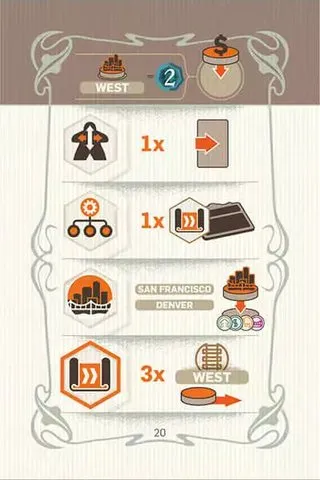
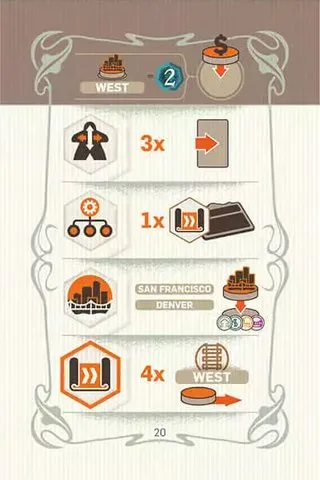
Normal 20. Donation: Health — 2 VP per project in the West. Chooses R&D. HR: slide 1 · Management: 1 R&D · Construction: San Francisco, Denver · R&D: 3 West.
Advanced cards
Same donation, chosen action and cities as the normal card with the same number; stronger values.
Advanced 1. Donation: Education — 3 VP per Human Resources Department. Chooses Human Resources. HR: slide 4 · Management: 2 Human Resources · Construction: Salt Lake City, Reno · R&D: 2 West.
Advanced 2. Donation: Education — 3 VP per Management Department. Chooses Human Resources. HR: slide 4 · Management: 2 Management · Construction: St. Louis, Chicago · R&D: 3 Midwest.
Advanced 3. Donation: Education — 3 VP per Construction Department. Chooses Human Resources. HR: slide 4 · Management: 2 Construction · Construction: Boston, Washington · R&D: 2 East.
Advanced 4. Donation: Education — 3 VP per R&D Department. Chooses Human Resources. HR: slide 4 · Management: 2 R&D · Construction: New Orleans, Houston · R&D: 2 South.
Advanced 5. Donation: Health — 2 VP per project in the Midwest. Chooses Human Resources. HR: slide 4 · Management: 1 Human Resources · Construction: San Francisco, Santa Fe · R&D: 3 West.
Advanced 6. Donation: Education — 1 VP per Department. Chooses Management. HR: slide 2 · Management: 3 Human Resources · Construction: San Francisco, Los Angeles · R&D: 3 West.
Advanced 10. Donation: Health — 2 VP per project in a small city. Chooses Management. HR: slide 2 · Management: 1 each of Human Resources, Construction and R&D · Construction: Kansas City, Chicago · R&D: 2 Midwest. Check against the physical component: three type icons over one tile.
Advanced 11. Donation: Welfare — $5 + 1 goods cube for 4 VP. Chooses Construction. HR: slide 2 · Management: 1 Human Resources · Construction: Portland, Boise, Denver, Los Angeles · R&D: 3 West.
Advanced 12. Donation: Welfare — 1 VP per standing employee. Chooses Construction. HR: slide 2 · Management: 2 Management · Construction: New York, Chicago, New Orleans, San Francisco · R&D: 3 West.
Advanced 13. Donation: Human Rights — 4 VP per Public Infrastructure project. Chooses Construction. HR: slide 3 · Management: 2 Construction · Construction: Cincinnati, Duluth, St. Louis, Kansas City · R&D: 2 Midwest.
Advanced 14. Donation: Human Rights — 3 VP per Industry project. Chooses Construction. HR: slide 3 · Management: 2 R&D · Construction: Albany, New York, Washington, Pittsburgh · R&D: 2 East.
Advanced 15. Donation: Health — 2 VP per project in the South. Chooses Construction. HR: slide 2 · Management: 1 Construction · Construction: New Orleans, Atlanta, Houston, Charleston · R&D: 2 South.
Advanced 16. Donation: Human Rights — 2 VP per Housing and Commerce project. Chooses R&D. HR: slide 2 · Management: 2 Human Resources · Construction: New Orleans, Atlanta · R&D: 4 South. Its printed four-space move overrides the usual 1–3 range.
Advanced 17. Donation: Human Rights — 3 VP per Railroad region. Chooses R&D. HR: slide 3 · Management: 2 Management · Construction: Boston, New York · R&D: 4 East. Its printed four-space move overrides the usual 1–3 range.
Advanced 18. Donation: Human Rights — 2 VP per donation. Chooses R&D. HR: slide 2 · Management: 1 Construction · Construction: Chicago, Omaha · R&D: 4 Midwest. Its printed four-space move overrides the usual 1–3 range.
Advanced 19. Donation: Health — 2 VP per project in the East. Chooses R&D. HR: slide 3 · Management: 1 R&D · Construction: Pittsburgh, Boston, Albany · R&D: 4 East. Its printed four-space move overrides the usual 1–3 range.
Advanced 20. Donation: Health — 2 VP per project in the West. Chooses R&D. HR: slide 3 · Management: 1 R&D · Construction: San Francisco, Denver · R&D: 4 West. Its printed four-space move overrides the usual 1–3 range.
Player aid
Picture
Card
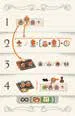
Player aid (4) — the four steps of a round on one side (A round).
Tiles
Department tiles
Base game: 2 copies of each of 16 Departments. The price under each Workstation is the cost to stand
an employee there; a blue background means an ongoing effect while one employee stands on it
(Departments, building them).
Picture
Department
1. Training and Partnerships — 1 Workstation ($2). Mission: take $8 or 8 employee moves.
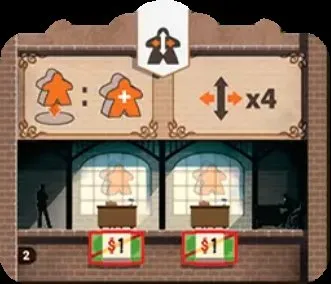
2. Recruiting — 2 Workstations ($1, $1). Either Mission and put a new employee from your supply in your Lobby, or 4 employee moves.
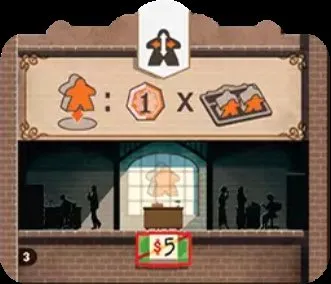
3. Safety and Quality — 1 Workstation ($5). Mission: 1 VP per 2 standing employees in your Company, rounded up (those on Missions don’t count).
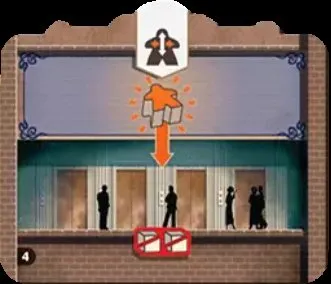
4. New Lobby — costs 2 extra goods cubes to build; no Workstation. New recruits and returning employees may arrive here or in the old Lobby. Works without an employee (FAQ). It is an alternate arrival space, not a free route between the two Lobbies.
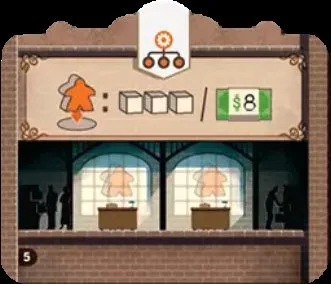
5. Purchasing — 2 Workstations (free). Mission: take 3 goods cubes or $8.
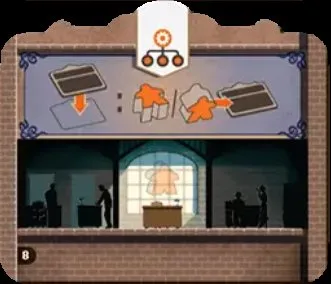
8. Property Management — 1 Workstation (free). Ongoing: whenever you build a Department, you may move one of your employees from anywhere in your Company onto it, lying down.
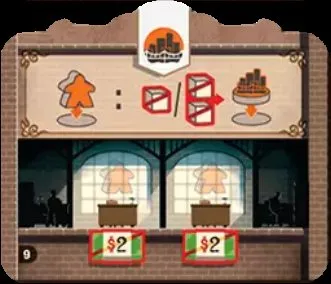
9. Engineering — 2 Workstations ($2, $2). Mission and pay 1–2 goods cubes to build a project in that region, like the starting Construction. You must be able to pay for the build before sending the employee, and the Mission employee is the standing one at this Department (FAQ, FAQ).
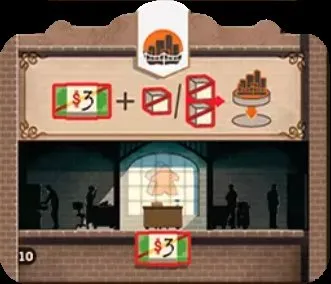
10. Construction Outsourcing — 1 Workstation ($3). Pay $3 plus the project’s 1–2 goods cubes to build anywhere on the map, without a Mission.
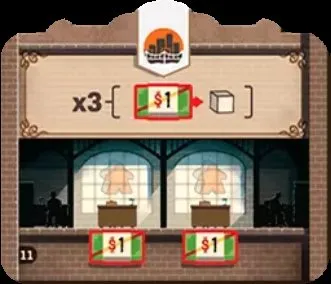
11. Supply Chain — 2 Workstations ($1, $1). Buy up to 3 goods cubes at $1 each.
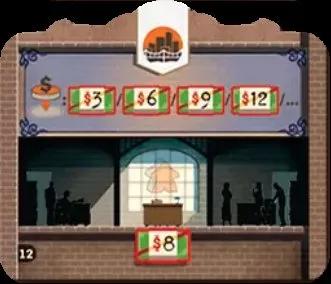
12. Communications — 1 Workstation ($8). Ongoing: your new donations cost $3, $6, $9, $12… instead of $5 steps.
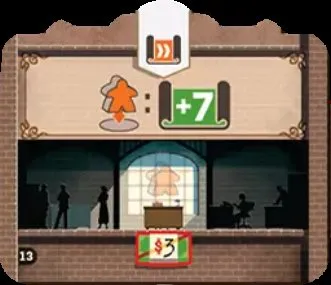
13. Advanced Research — 1 Workstation ($3). Mission: 7 study points.
14. Advanced Design — 3 Workstations ($3 each). 4 study points per standing employee.
15. Charitable Giving — 1 Workstation ($3). Mission, pay your next donation price and put your disk on top of another player’s donation disk; never the same donation twice (donations, FAQ). Neutral disks in a 2–3 player game do not belong to another player.
16. Telegraph Operators — 1 Workstation ($2). Ongoing: each transport step costs 1 study point less (minimum 1).
Expansion Departments (17–32)
[D&D] 2 copies of each, marked with a star (New Departments).
Picture
Department
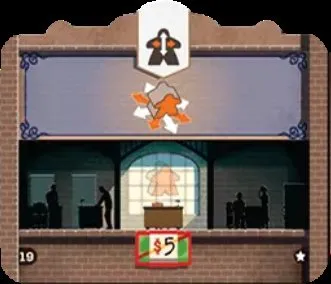
17. Human Resources Administration — 1 Workstation ($3). Mission: for each Human Resources Department you own (starting one included), move one employee anywhere in your Company; it lies down.
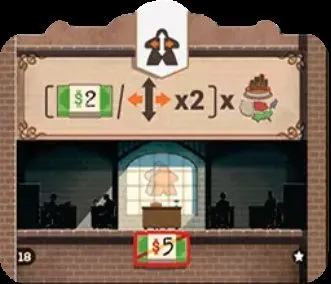
18. Local Partners — 1 Workstation ($5). Pick a region: for each project you built there, $2 or 2 employee moves.
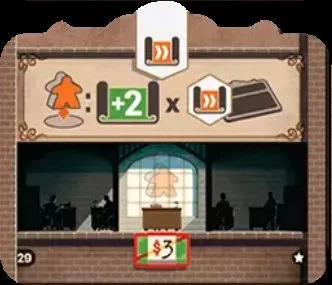
19. Corporate Communication — 1 Workstation ($5). Ongoing, if an employee stands here at the start of the turn: your employees may also move diagonally this turn.
20. Green Spaces — 1 Workstation ($10). End of game, if an employee stands here: 2 VP per space of your Company board without a Department.
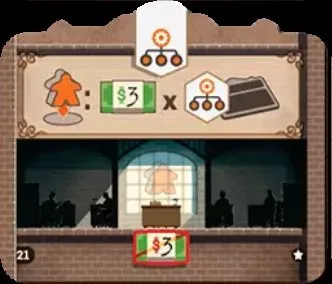
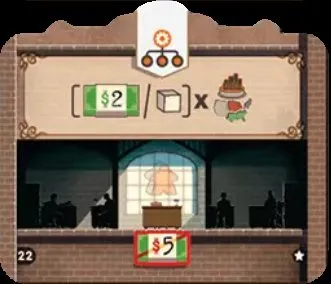
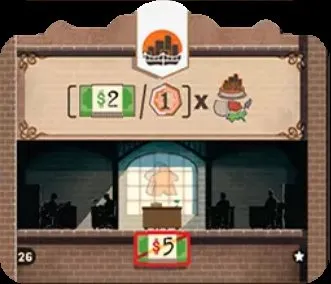
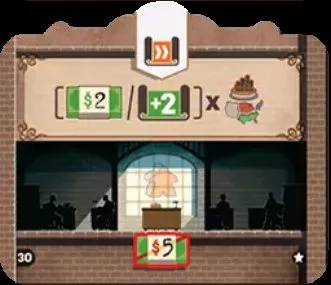
21. Accounting — 1 Workstation ($3). Mission: $3 per Management Department you own (starting ones included).
22. Branding — 1 Workstation ($5). Pick a region: for each project you built there, $2 or 1 goods cube.
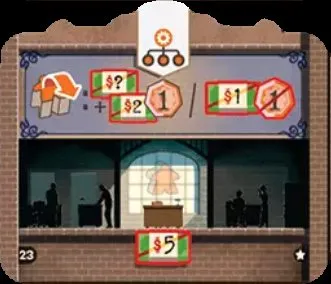
23. Payroll Management — 1 Workstation ($5). Ongoing (not in the round its employee was stood up): when you stand an employee up, pay the normal price, or $2 more and gain 1 VP, or just $1 and lose 1 VP (not at 0 VP or less).
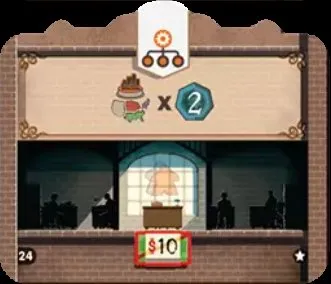
24. Public Relations — 1 Workstation ($10). End of game, if an employee stands here: 2 VP per project you built in one region of your choice.
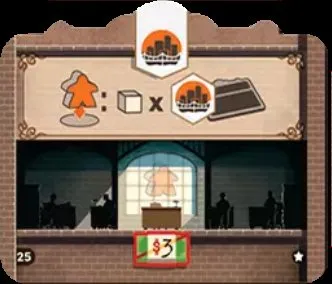
25. Production Lines — 1 Workstation ($3). Mission: 1 goods cube per Construction Department you own (starting one included).
26. Renovation — 1 Workstation ($5). Pick a region: for each project you built there, $2 or 1 VP.
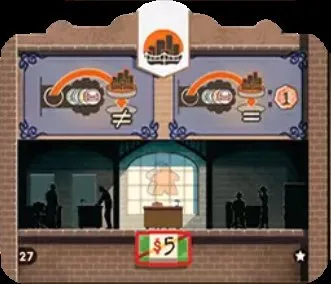
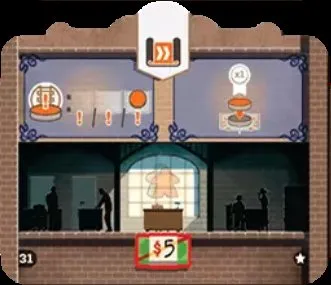
27. Political Lobbying — 1 Workstation ($5). Ongoing: you may build projects on spaces of another type; building in a small city or on a matching space gives 1 VP.
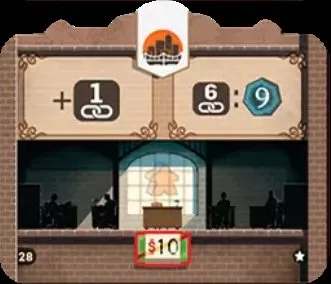
28. Post Office — 1 Workstation ($10). End of game, if an employee stands here: +1 connection point (to a maximum of 6); with 6 points, +9 VP on top of the connection score (FAQ). It adds one point to your total; the extra 9 VP applies only if that brings you to six.
29. R&D Coordination — 1 Workstation ($3). Mission: 2 study points per R&D Department you own (starting one included).
30. Knowledge Sharing — 1 Workstation ($5). Pick a region: for each project you built there, $2 or 2 study points.
31. Archives — 1 Workstation ($5). Ongoing: you may take a lower transport income than your disk’s space, and you may enter a track’s last space and take its bonus even if someone is already there.
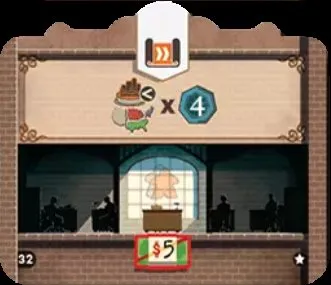
32. Network of Libraries — 1 Workstation ($5). End of game, if an employee stands here: 4 VP per project in the region where you built the fewest.
Timeline tiles
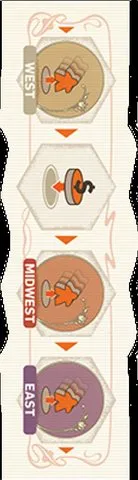
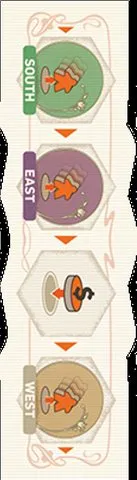
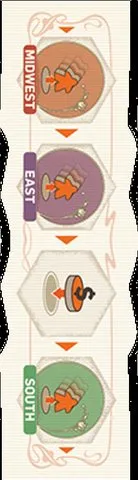
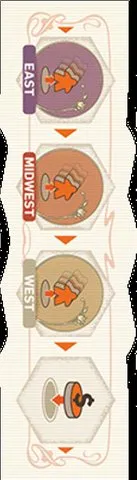
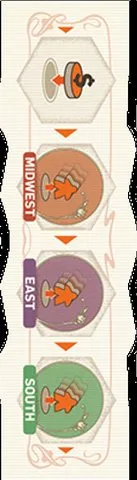
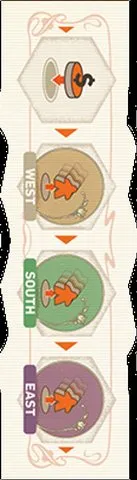
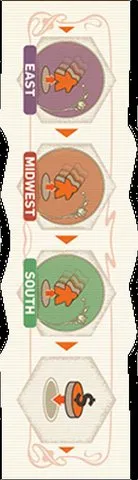
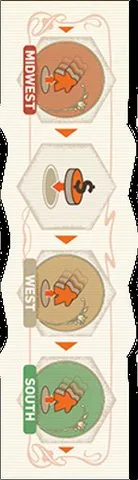
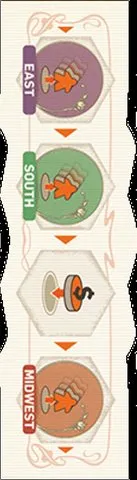
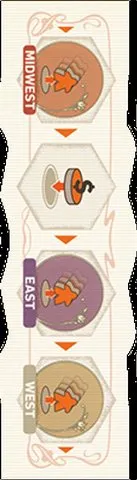
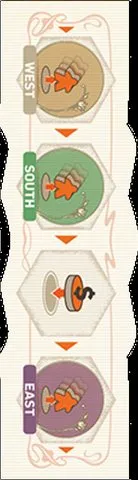
8 double-sided tiles, 16 faces; four are used each game, on random sides. Each face has one space per
row — Human Resources, Management, Construction, R&D from top to bottom — showing a region (Take
Income) or a donation (Events). A region event pays only employees on Missions in that region, so the first event can pay nobody; the event never restricts where you may send employees (FAQ, FAQ).
Picture
Spaces (Human Resources → R&D row)
Face 1: West, donation, Midwest, East.
Face 2: South, East, donation, West.
Face 3: West, donation, South, Midwest.
Face 4: Midwest, East, donation, South.
Face 5: Donation, South, Midwest, West.
Face 6: East, Midwest, West, donation.
Face 7: Donation, Midwest, East, South.
Face 8: South, West, East, donation.
Face 9: Donation, East, West, Midwest.
Face 10: South, West, Midwest, donation.
Face 11: Donation, West, South, East.
Face 12: East, Midwest, South, donation.
Face 13: Midwest, donation, West, South.
Face 14: East, South, donation, Midwest.
Face 15: Midwest, donation, East, West.
Face 16: West, South, donation, East.
Action markers
Picture
Marker
Human Resources — moves along the top row of the Timeline (Select a Timeline).
Management — second row.
Construction — third row.
R&D — bottom row.
Action Choice tiles
Picture
Tile
Action Choice tile (one per player colour; this is grey) — once per game, use a different action from the one chosen; 3 VP if unused (Action Choice tiles, FAQ). The first player chooses the action for everyone and cannot switch their own action with this tile.
Blue player’s tile.
White player’s tile.
Yellow player’s tile.
Project tabs
Four double-sided tabs per player. Listed as they slide out, right to left: project spaces (with
the income their built disk adds), then VP spaces; the step costs are in study points
(project tabs). Study points may be split among any tabs and transport tracks, with leftovers lost at turn end (FAQ). Every VP space already revealed scores at game end even if earlier project spaces remain empty (FAQ). The B side ends with the +3 donation bonus;
its values are not pictured here — check against the physical component.
Picture
Tab (side A)
Housing (build: 1 goods cube) — starting space (its disk is placed during setup, no income), then $1 · a new employee or $1 · $1; then VP 1 · 2 · 3 (total 6). Step costs 1 · 1 · 1 · 2 · 3 · 4.
Public Infrastructure (2 goods cubes) — empty starting space (no disk at setup), then 1 VP · 1 VP · 2 VP as income; then VP 4 · 5 · 6 (total 15). Step costs 4 · 4 · 6 · 6 · 8 · 10.
New Donation tiles
[D&D] Each covers one printed donation column (New Donations).
Picture
Tile
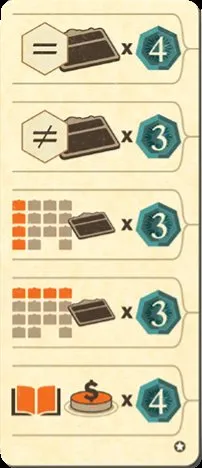
Education — 4 VP per Department you built of one type (chosen at scoring) · 3 VP per different type of Department you built · 3 VP per Department you built in your leftmost column · 3 VP per Department you built in your top row · 4 VP per Education donation you made. New Donation tiles score their own printed conditions wherever placed; donations on them count as the covered board column’s type (FAQ).
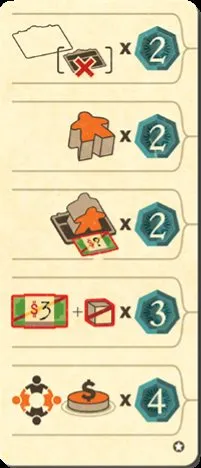
Welfare — 2 VP per space of your Company board without a Department · 2 VP per inactive employee (on the board or on a Mission) · 2 VP per standing employee on a Workstation that cost $1 or more · pay $3 + 1 goods cube for 3 VP, up to 4 times · 4 VP per Welfare donation you made. Pay the money and goods during final scoring, not when you place the donation disk (FAQ); the conversion can be repeated up to four times.
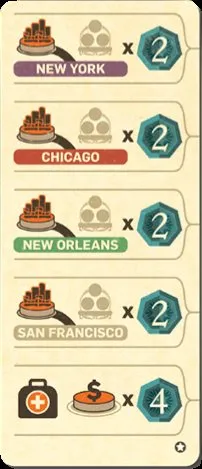
Health — 2 VP per medium city linked by your own chain of disks to New York · the same for Chicago · for New Orleans · for San Francisco · 4 VP per Health donation you made.
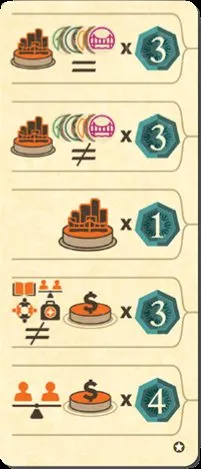
Human Rights — 3 VP per project you built of one type (chosen at scoring) · 3 VP per different project type you built · 1 VP per project · 3 VP per donation type you made · 4 VP per Human Rights donation you made. Housing and Commerce each count as projects, including the setup Housing disk (FAQ).
Tokens & pieces
Picture
Piece
Employees (15 per colour) — standing = active, lying = inactive (employees, FAQ, FAQ). Using a Department does not tire its employee; moving it does, and a Mission uses the standing employee at the activated Department.
Player disks (30 per colour) — score, transport tracks, project tabs, buildings and donations.
Goods cube (40 of value 1). You may sell cubes for $1 each at any time, including during final scoring (FAQ).
Goods cube worth 5 (5).
$1 banknotes (40).
$5 banknotes (30).
$10 banknotes (20).
First-player marker (locomotive) — passes clockwise each round; in solo it shows who chooses.
Timeline marker (gear) — marks the chosen row and its event (Select a Timeline).
Icons
Picture
Meaning
Human Resources Department / action.
Management.
Construction.
Research & Development.
Send the employee who took the action to a Mission area.
An employee on a Mission area.
Bring an employee home from a Mission area to your Lobby.
Active (standing) employee.
Inactive (lying) employee.
Take a new employee from your supply into your Lobby.
One employee move: one orthogonal step; the employee lies down.
A Department.
Build a new Department on an empty space.
A donation.
Make a donation.
Put your donation disk on a space holding another player’s disk.
A construction disk on the map.
A construction disk in a small city.
Major-city connection points.
Income from your current transport space.
Income from the revealed spaces of your project tabs.
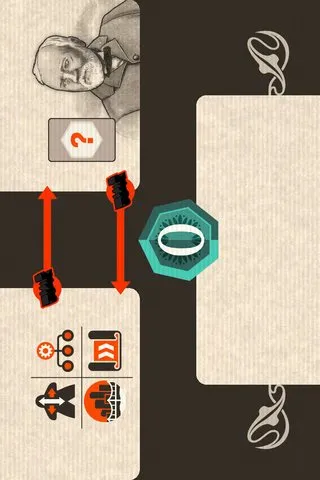



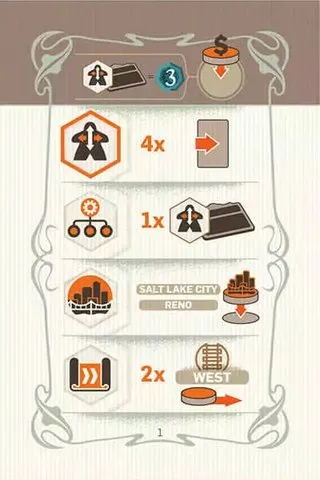
 Human Resources Department. Chooses Human Resources. HR: slide 4 · Management: 1 Human Resources · Construction: Salt Lake City, Reno · R&D: 2 West.
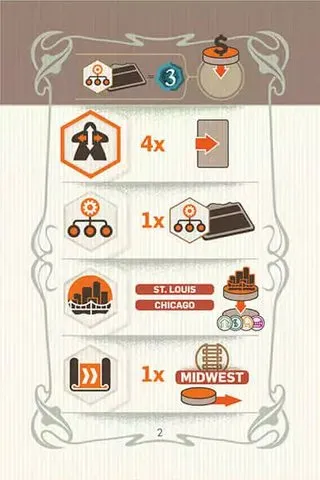
 Management Department. Chooses Human Resources. HR: slide 4 · Management: 1 Management · Construction: St. Louis, Chicago · R&D: 1 Midwest.
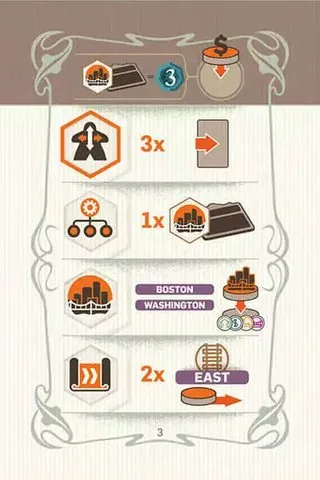
 Construction Department. Chooses Human Resources. HR: slide 3 · Management: 1 Construction · Construction: Boston, Washington · R&D: 2 East.
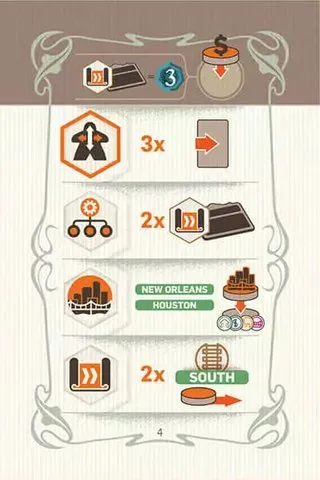
 R&D Department. Chooses Human Resources. HR: slide 3 · Management: 2 R&D · Construction: New Orleans, Houston · R&D: 2 South.
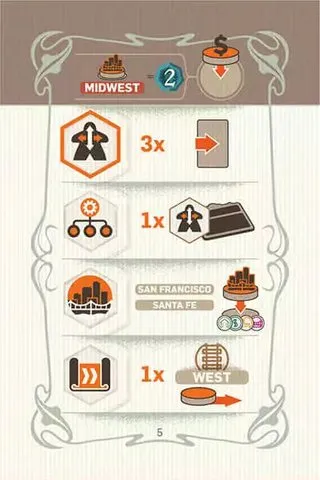
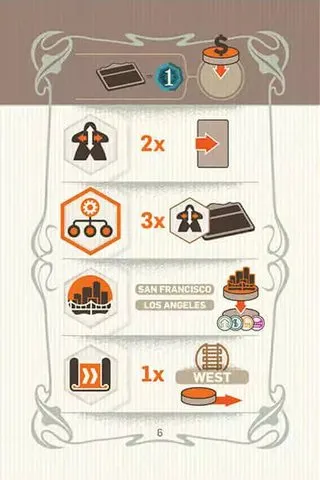
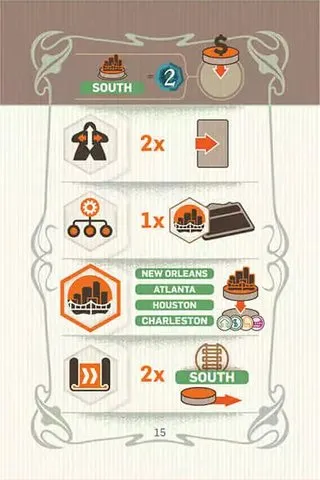
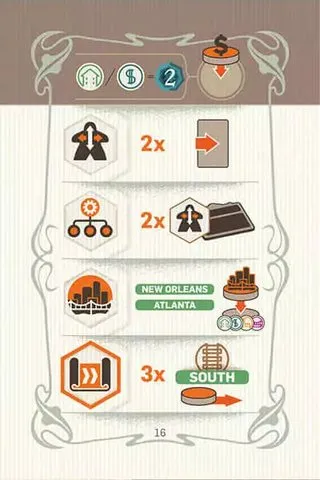
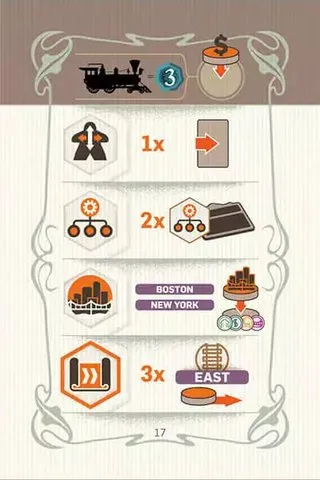
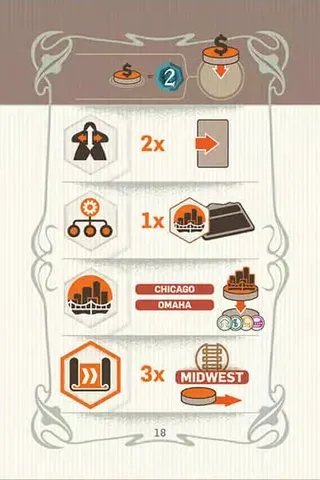
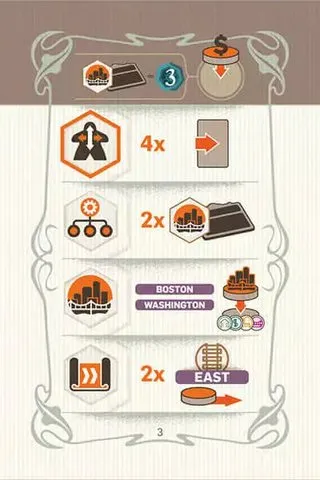
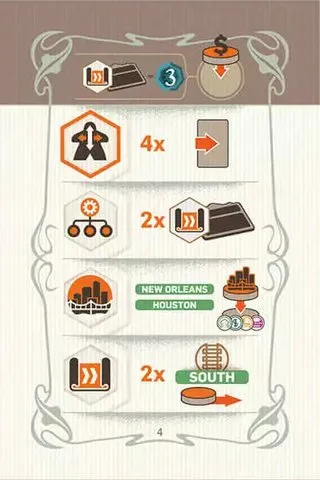
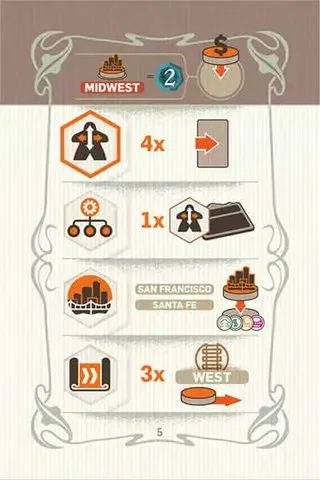
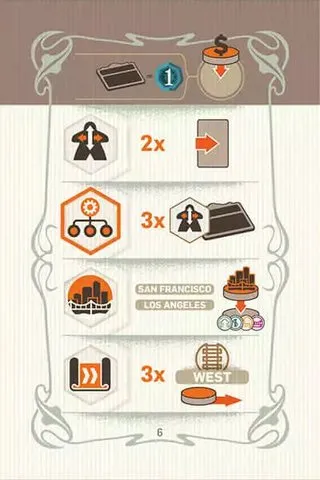
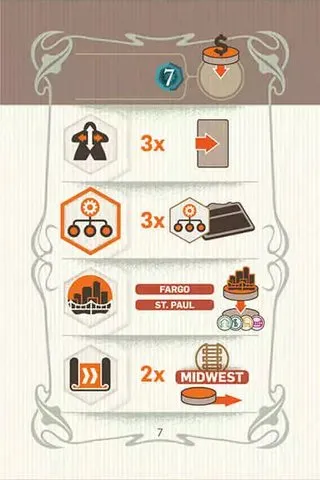
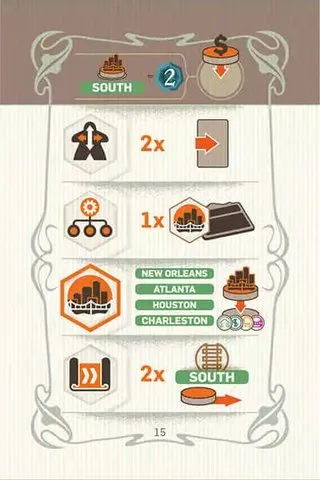
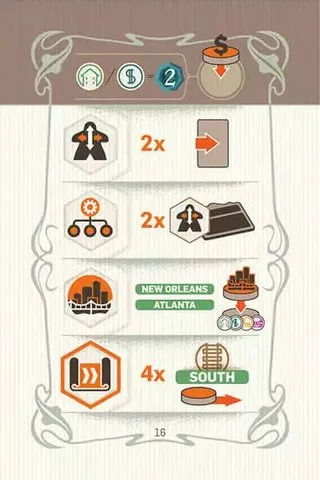
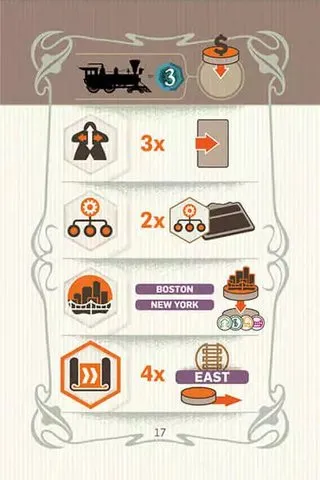
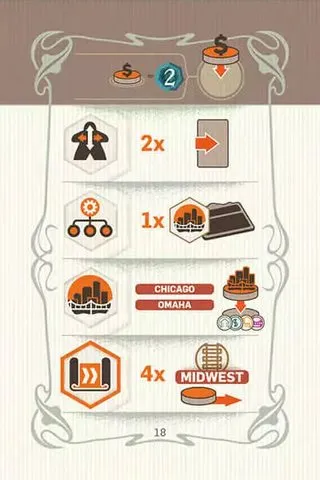
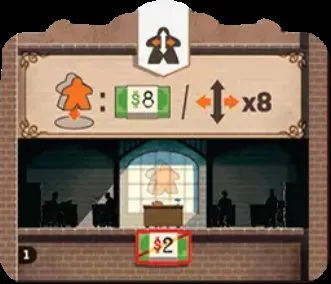
 Mission: take $8 or 8 employee moves.
 new employee from your supply in your Lobby, or 4 employee moves.
 VP per 2 standing employees in your Company, rounded up (those on Missions don’t count).
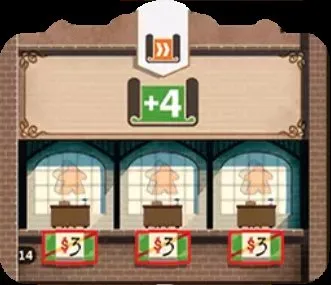
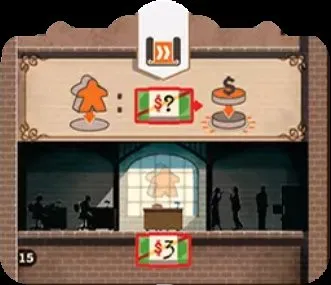
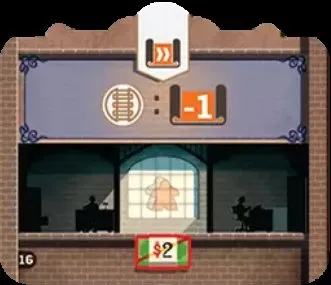
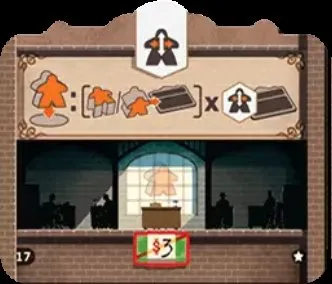
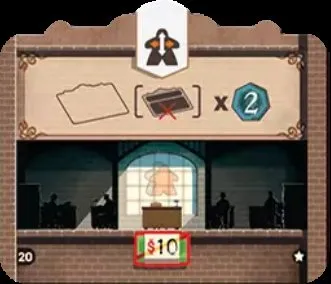
 VP per space of your Company board without a Department.











 +3 donation bonus;
its values are not pictured here — check against the physical component.
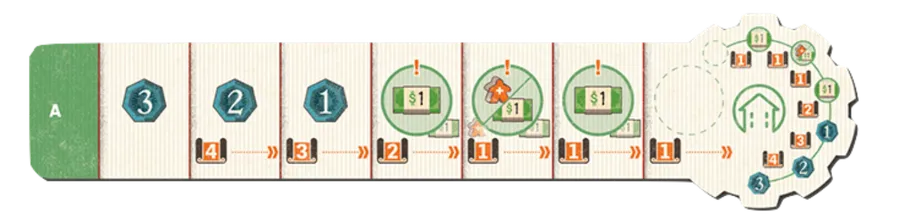
 (build: 1 goods cube) — starting space (its disk is placed during setup, no income), then $1 · a new employee or $1 · $1; then VP 1 · 2 · 3 (total 6). Step costs 1 · 1 · 1 · 2 · 3 · 4.
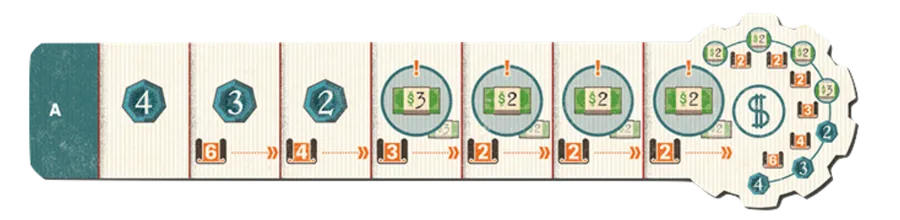
 (1 goods cube) — $2 · $2 · $2 · $3; then VP 2 · 3 · 4 (total 9). Step costs 2 · 2 · 2 · 3 · 4 · 6.
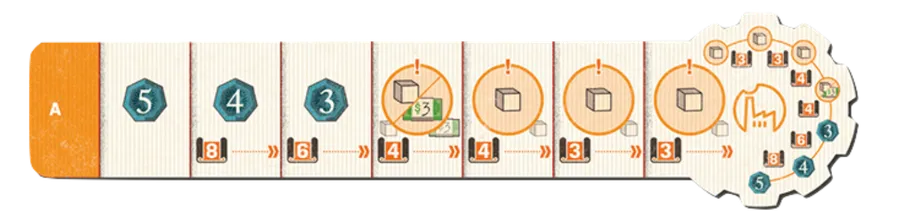
 (2 goods cubes) — 1 goods cube · 1 goods cube · 1 goods cube · a goods cube or $3; then VP 3 · 4 · 5 (total 12). Step costs 3 · 3 · 4 · 4 · 6 · 8.
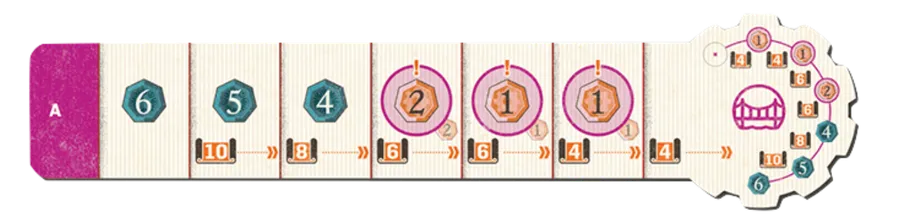
 (2 goods cubes) — empty starting space (no disk at setup), then 1 VP · 1 VP · 2 VP as income; then VP 4 · 5 · 6 (total 15). Step costs 4 · 4 · 6 · 6 · 8 · 10.