Boards and Basic Concepts
Money, the player pieces, how an action column works, Technology tiles, the game board, Location bonuses and adjacency.
Money
 Paying means putting banknotes from your supply back in the bank; gaining means taking them.
You may make change at any time.
Player pieces
 /
 Wireless Stations send the radio signal. An Unmodulated
station sends Unmodulated signals (Transmission), a Modulated one sends
Modulated signals (Modulation).
 Signal tokens are the signal on the map.
 Credit tokens are promises of future discoveries; you spend them on
Funding and Supply.
The player boards
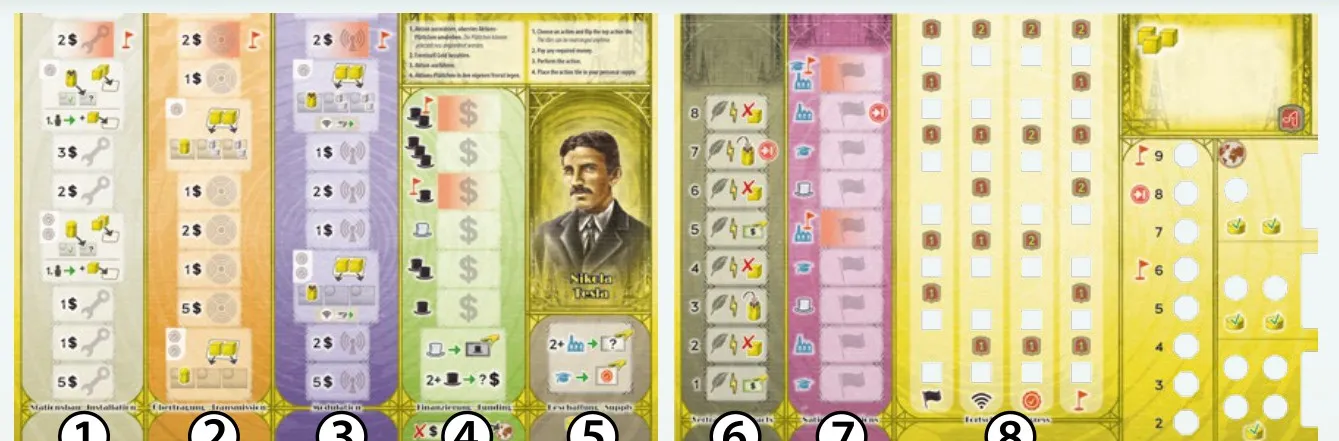
- Installation — action column
- Transmission — action column
- Modulation — action column
- Funding — action column that gives money and Tycoons
- Supply — the action that reloads columns; it has no column of its own
- Contracts — where the Contracts you take are stored
- Nations — the Flags of the countries you reach
- Progress — four tracks of Signal tokens; every token you remove raises that track’s value
To the left of the Funding and Nations columns are printed icons —  Tycoon,
 Factory,
 Scientist and
 Target position. A printed icon is active only when a
tile lies to its right. Icons on tiles are always active.
Action columns
Installation, Transmission and Modulation each have 6 spaces for Action tiles and 2 Action Boxes: the lower is the Basic Action, the upper the Advanced Action. Tiles fill a column from the bottom up, and you may rearrange the tiles in a column at any time.
To use an Action Box, every space below it must be covered — by a tile, or by paying the dollars printed on each empty space. Then:
- Flip the top Action tile of the column so everyone sees the action.
- Pay for the empty spaces up to the chosen box.
- Do the action.
- Return the Action tile, face up, to your supply below the column.
Technology and Super Technology tiles
 Technology tiles work exactly like Action tiles of their column. A Super Technology tile
covers 2 spaces, both counted as paid. You get them as Location bonuses and, once used, they go to your supply
like any Action tile. There are 6 of each Technology and 2 of each Super Technology: when a type runs out you
can no longer get it.
The common displays
When a Contract or Tycoon tile is taken from the board, reveal a new one from its stack at once.
The game board
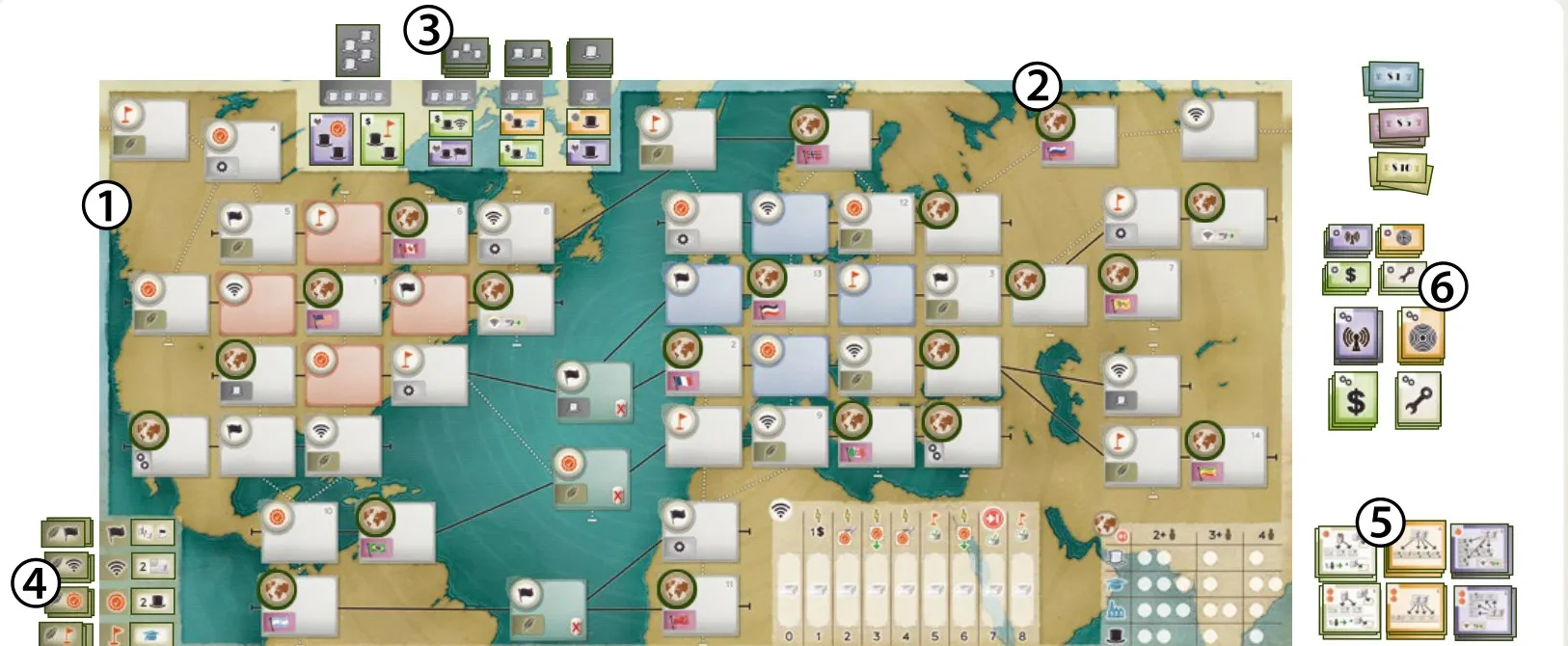
- Location spaces — the map
- Location tiles — bonus tiles on the empty corners
- Tycoon display — four levels
- Contract display — four stacks
- Patent stacks — beside the board
- Technology tiles — beside the board
Each Location shows a reward icon in its top-left corner. The four rewards match the four Progress tracks:
Network Expansion,  Nations,
 Innovation and
 Network Integration. The small numbers on some Locations are only for the solo game.
Location bonuses
The bottom-left corner of a Location may show a bonus. The first time you place one of your pieces there
(, or ) you gain it at once — a second piece of yours on
the same Location gains nothing more.
| Bonus | You gain |
|---|---|
 Contract | The face-up Contract whose back matches this Location’s reward icon (if there is one). Flip it, put it on the lowest free space of your Contracts column and take that space’s immediate bonus. Refill the display. |
| Technology | One Technology tile of your choice, on the lowest free space of its column |
| Super Technology | One Super Technology tile of your choice; make room by rearranging the column if needed |
| Flag | Your Flag of that country, on the lowest free space of your Nations column |
| Permanent Link | Your marker moves 1 space on the Permanent Links track; take the immediate bonus above the new space |
| Tycoon | A level 1 Tycoon tile, in its column |
Contracts
A Contract in your Contracts column shows a condition. The number left of its space says how many times you must meet that condition (1 to 8). As soon as you do, flip the Contract to its back: only completed Contracts give icons at the end. The conditions are listed in Cards & Components.
Placing a Contract also gives the immediate bonus  printed on its space:
- take the pictured Action tile from your supply and put it in its column;
- remove 1 Signal token from your board (the lowest of any Progress track, or one from the Ready area) and return it to the box;
- turn one of your installed Wireless Stations to its Modulated side.
Adjacency
Locations are adjacent when a white dotted (vertical) or black (horizontal) line joins them, even far apart: follow the line. The map wraps around the globe in the north, but not in the south. You can never build on an ocean space marked with a red cross.