Meeting Table Actions
The nine action spaces: gaining Notebook tiles, completing rows and columns, Research cards, publishing and citing Treatises, Insight actions and moving on the City Map.
Gaining Notebook tiles
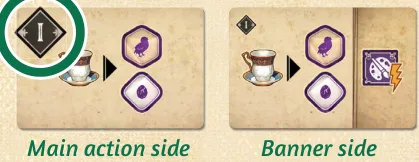
Each Notebook tile has a main action side and a banner side; the Roman numeral in the corner is its level. Three action spaces (top row of the Meeting Table) sell them for Coffee:
| Action | Cost | You take | Then trigger |
|---|---|---|---|
 | 1  | the top tile of the level I or level II stack (left column) | nothing |
 | 2 | either tile in the center column | its banner effect |
 | 3 | either tile in the right column | its main and banner effects, in either order |
Each action is paid in full each time you take it. A tile gained by any other effect is free and comes from the top of the level I or II stack.
Placing the tile. Put it banner side down in the leftmost empty space of any row of your
player board. A space with the  icon needs Cured Clients: covering your first such icon
needs 0, the second 1, the third 2.
Refilling. An empty center space takes the top tile of its row’s stack, flipped banner side up. An empty right space takes the center tile slid across, then the center is refilled. An exhausted stack is not refilled, but tiles still slide right. Choosing an empty space scores the Victory Points printed in it instead (nothing else happens).
Replacing Notebook tiles
Only if you cannot place the new tile anywhere (not enough Cured Clients, or no space left) you may replace any tile on your board with it, discarding the old one. Otherwise discard the new tile. Tiles never move once placed.
Completing rows and columns
A row or column with three tiles is complete. Take the  player-color Insight
at its end into your dial’s reserve — this also unlocks the Insight effect printed under it (an
 Elevate for rows, a Generate for columns) for later Inkpot activations. Filling all
nine spaces gains you a
 Reputation point.
Insight actions
| Action | Effect |
|---|---|
   | Generate one Minor Growth, one Minor Freedom and one Minor Passion Insight. |
 | Up to two Elevations and one Transfer, in any order. |
How the four Insight effects work: Insight effects.
Research and Treatises
Two action spaces:  gain a Research card, and
 play one or two Research cards or
 publish a Treatise.
Gaining Research cards
Draw the top card into your hand (no limit). Then you may swap any one card from your hand with either face-up card of the display.
Playing Research cards
You can only play a card when an effect shows the icon. Lay it face up in
front of you — it is now in play — and trigger the effect at its bottom. The Location tags on
in-play cards count towards your tags.
Publishing a Treatise
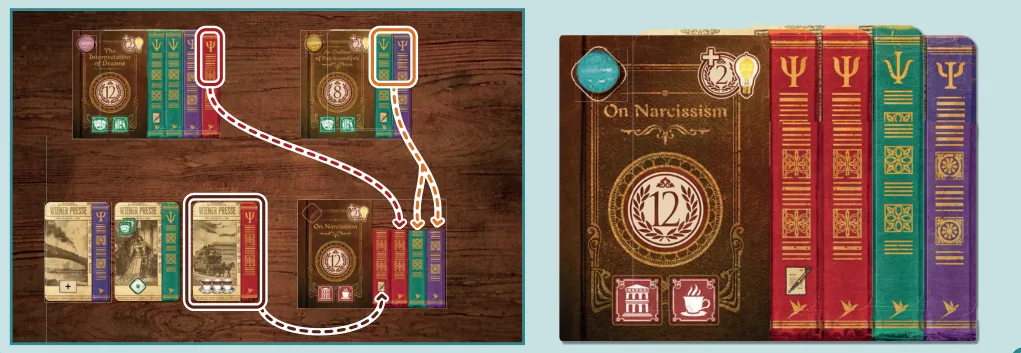
Each Research card shows one colored Volume. A Treatise tile shows the Volumes it needs.
- Choose a Treatise from the display.
- Set aside one of your in-play Research cards matching the color of the leftmost Volume (marked with the quill icon).
- Gather the remaining Volumes, exact number and colors, from your in-play cards and/or by citing other players’ Treatises. Not from your hand, not your own Treatises, not other players’ in-play cards.
- Overlap the cards in the order shown and lay the tile over them so the colors line up.
- Put a player-color Insight from your dial (reserve or any ring) on the
tile’s upper-left corner. It stays there.
- Score the Victory Points in the middle of the tile.
The tile’s two Location tags are now in play for you; the cards under it are Volumes, and their own tags no longer count.
Citing Treatises
- Take the rightmost card of another player’s Treatise; you may take more than one from the same Treatise, working inward without leaving gaps.
- Each player you cite gains a
 Bright Idea and scores 2 VP per Volume
(shown in the tile’s top-right corner).
- You can’t end up with a spare Volume: cite only what the Treatise needs.
Moving your Professor or Freud
| Action | Effect |
|---|---|
 /  | Advance your Professor 1–2 Locations clockwise, or move it straight to Freud’s Location (it must start elsewhere). |
 | Advance Freud 1–3 Locations clockwise. |
After the move you may trigger the new Location’s effects — Location effects.