Contracts and Loading
Panamax contracts: taking them, front and back, loading ships and the Rail table, ship capacity, completing contracts and building ships
Take a contract
- With a grey (4–6) die you may take the contract card beside that column. With the Passenger benefit you may instead take the Inbound Cargo card or the top card of the Draw pile.
- Take dice of your colour from the Warehouse first, then the Dice Pool, one per container, and set each to the container’s value. If you do not have enough dice for the side you want, you cannot take that card.
- Look at both sides before you choose; the side you use decides the rules for its dice (BGG thread).
- The card you took is replaced by the Inbound Cargo card, and the Inbound space by the top of the Draw pile. When the Draw pile runs out, shuffle the completed contracts into a new one.
- At the end of your turn you may hold no more than two incomplete contracts, the setup contract included. You may take a third if loading finishes one in the same turn (Official FAQ).
Contract cards
| Picture | What each side means |
|---|---|
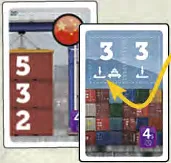
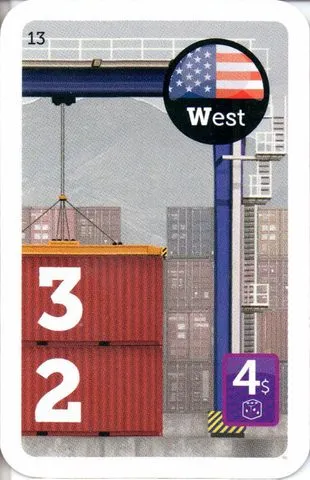 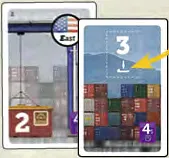 | Front (national): 1–3 printed-value containers load only in that nation’s Loading zone; a gold  container must go to Rail. Completing it earns that nation’s flag. Back (generic): containers are worth 3 each (one or two depending on front length), may load in any Loading zone, and a white Rail icon is optional; completing it earns no flag. Choose the side when taking the contract (FAQ). |
A Rail icon is on one side only: a card with the gold icon on its front has none on its back, and the other way round. Every contract, front and back, is listed in Cards & Components.
Load cargo
- Load up to the number your die allows (bottom row 1, middle 2, top 3, Executive 3). You need not use all of it. Dice can come from any of your contracts, even several in one action.
- A national die goes onto a ship in its nation’s Loading zone; a generic die onto a ship in any Loading zone. Dice on Military ships are impossible: they carry nothing.
- You may load onto any ship, your own, another company’s or a Unique ship (BGG thread).
- Ships in a Waiting zone may be moved into either of its two Loading zones when you load them, and are then stuck to that Loading zone (BGG thread).
- One die per ship (and one on the Rail table) per turn. Only a free action or a Stevedore card lets you add a second die to the same ship.
- You may only move your own company’s dice (BGG thread).
How to load ships
Each ship tile shows its slots and, in each slot, the minimum–maximum sum of all dice it may carry.
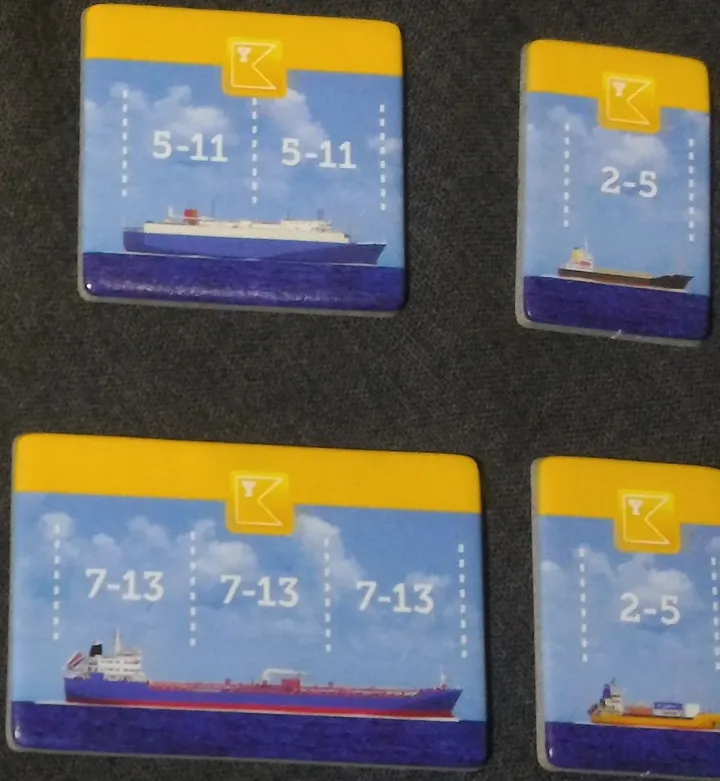
| Ship | Capacity and cost |
|---|---|
| 1-slot (two per company) | 1 slot, sum 2–5; $5 to build |
| 2-slot | 2 slots, sum 5–11; provided at setup |
| 3-slot | 3 slots, sum 7–13; $7 to build |
| San Juan Prospector | 4 slots, sum 9–18 |
| Cruise ships | 3 dice showing 1 or 2; 2 dice to sail |
At setup, a company’s 1-slot ship starts in the canal. Its 2-slot ship may start in either Loading zone or Waiting (FAQ).
- A ship may move only once the sum of its dice reaches its minimum.
- You may not fill a ship’s last slot with a die that leaves the sum below the minimum or above the maximum.
- Unique ships have their own loading rules: see Unique ships.
Rail cargo
- A container with the gold Rail icon must be loaded onto the 1st wagon of the Rail table, in the leftmost free space. A container with the white icon (back side) may go there or onto a ship.
- No other die may go on the Rail table except through the Rail free action (BGG thread).
- The 1st wagon holds 4 dice. When it is full, nobody can load there until next round — a contract whose rail die cannot be placed is stuck (BGG thread).
- Dice on the Rail table pay no cargo fee. At round end they set the new turn order and earn flags: see Rail table.
Complete a contract
- When the last die leaves a front (national) contract, the company takes that nation’s flag from the supply and places it on its Clipboard (Flags and free actions). A back-side contract earns no flag.
- Discard completed contracts face up; you may sort them by nation.
- Flags are limited to 11 per nation; the flags on the Rail table are not part of that supply (BGG thread).
Build ships
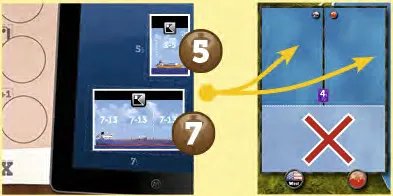
- At any moment of your turn, as often as you can pay: 1-slot ship $5, 3-slot ship $7, from company money.
- Put the new ship in any Loading zone (dark blue), not a Waiting zone.
- Building is not an action. You start with a 1-slot ship in the canal and the 2-slot ship already built.