Weather
Paragliders weather: thermal value, sun exposure, wind on the cliffs and clouds; the hourly weather change with its four update types; and the wind push round.
Weather modifiers
After moving, check the four conditions on your new hexagon and add them up before moving your Altitude Marker.
Thermal value
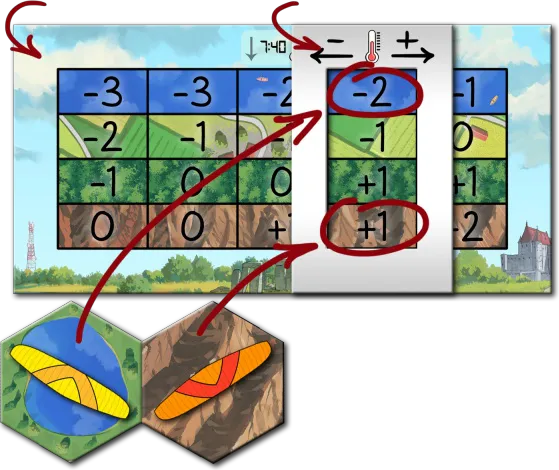
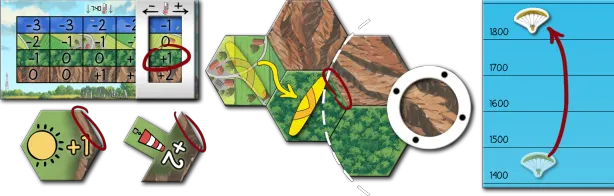
Each terrain — mountain, forest, lake, field — heats differently. The Thermal Lift Board has a row per terrain and a column per temperature; the Thermal Indicator frames today’s column. Read the value in the frame for your hexagon’s terrain: positive moves you up, negative down.
Sun exposure
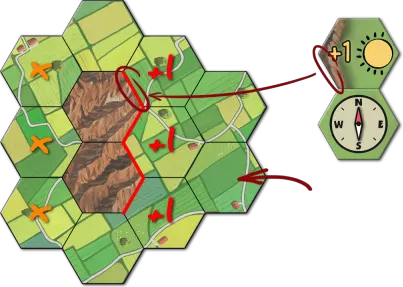
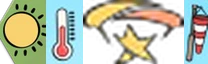 The morning sun heats the east faces of the mountains, the afternoon sun the west
faces. If you are next to a mountain (not on it) and that mountainside faces the sun, gain 1.
The sides that count are the mountain-textured sides shown on the Sun Exposure token (or printed on
the Map Edge before 12:00).
Cliff under wind
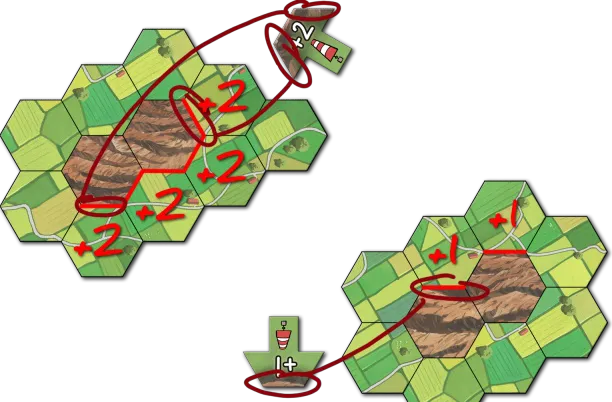
 The Windsock tokens on Map Edge A show the wind’s strength and direction. If you are
next to a mountain (not on it) and that mountainside is under the wind, gain:
- Wind strength 1: 1, only for a mountain exactly in the wind’s direction;
- Wind strength 2: 2, also for the two mountainsides one step either side.
Cloud suck
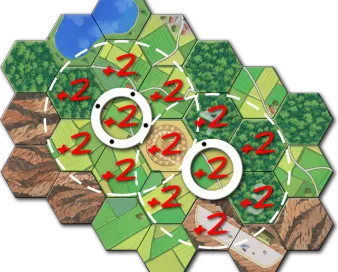
A cloud marks a thermal. If you are on or next to a cloud’s hexagon, you are under it: gain 2 — only 2, however many clouds are over you.
Weather change
The day starts with 3 clouds and the wind from the North, adjusted by the first Weather Tile. Each Weather Tile lasts one hour; the whole day’s forecast lies face up above the time track.
Update time
After the last player’s turn, they move the time marker one space. If it reaches a new Weather Tile (a new hour), update the weather now — between the last and the first player’s turns. The weather does not change every round.
Update types
The icons on the new tile (and sometimes on the Weather Board under it) say what changes. Update in this order: temperature, sun exposure, clouds, wind.
Temperature change
 Add up the thermometer icons on the tile and the board. Positive: slide the Thermal
Indicator that many columns right; negative: left. Moves past either end are lost.
Sun exposure change
The day starts with the sun on the east faces, as printed on the Map Edge; the token waits on the Weather Board.
- 12:00: put the Sun Exposure token on the Map Edge, zenith side up, covering the east exposure — no sun bonus.
- 14:00: flip it to the west side.
- 18:00: flip it back to the zenith side — no more sun bonus.
Wind strength and direction change
The number under the windsock is the new wind strength (no number: no wind). If it
differs, flip the Windsock tokens, keeping their direction — both together from or to “no wind”, the
top one only for a change of strength. A rotation icon turns the wind 1 or 2 steps clockwise or
counter-clockwise; no icon, no turn. The arrows at the bottom of the tile remind you of the
wind push round.
Cloud number change
The cloud icon adds or removes that many clouds.
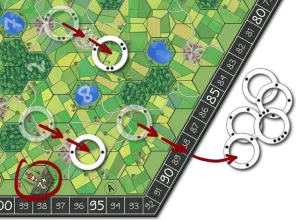
- Add: draw a cloud token; place a random cloud ring centred on the map hexagon with that number. Already a cloud there? Draw again.
- Remove: draw a cloud token; remove the cloud ring with that many dots. Not on the map (or a number above 7)? Draw again.
Put all drawn tokens back in the Cloud Bag afterwards.
Wind push round
With any wind after the weather update, play this special round before the first player’s turn.
Push clouds
Move every cloud 1 or 2 hexagons (the wind strength) in the wind’s direction. A cloud blown off the map goes back to the pool.
Wind push turn order
Pilots act from the lowest altitude to the highest. At equal altitude, the one furthest along the wind’s direction goes first.
Push paragliders
In that order, each pilot chooses:
- Be pushed: move 1 or 2 hexagons with the wind, without turning the pawn;
- Resist: stay put and lose 1 or 2 altitude;
- Mix (strength 2 only): pushed 1 hexagon and lose 1 altitude.
Blocked by a mountainside or the map edge: you stop, losing nothing. You cannot resist if that would take you below a mountaintop you are flying over, or if another pilot is right under you — then you must be pushed. You may collect tokens you are pushed over (Collecting tokens).