Teach the Game
Find the hidden gemstones by tracing waves and combining clues.
How you win
“Behind this screen is a mine of coloured shapes. Ask where a wave comes out and what colour it becomes, then reconstruct the entire mine. The first correct solution wins.”
With two players, each of you hides a mine and investigates the other. With three to five, one quiz master runs a shared puzzle and the other players race to solve it.
The boards
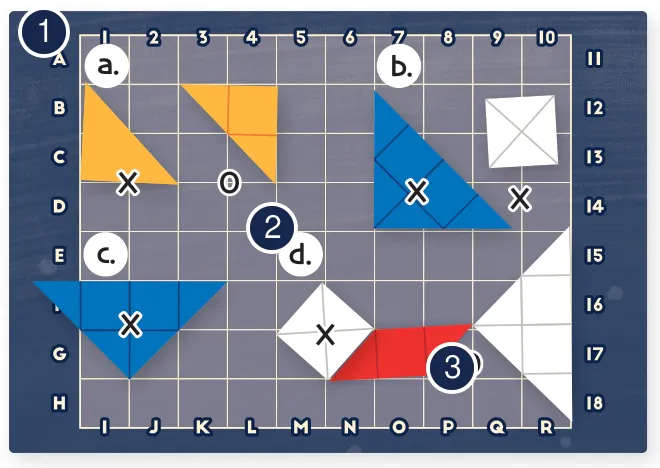
- Perimeter labels choose where to send a wave.
- The grid fixes the positions and orientations of pieces.
- Hidden gemstones redirect and colour the wave.
A turn
- Ask for a wave’s exit point and colour, or ask what occupies one coordinate.
- The quiz master traces the answer; write it on your sheet.
- When ready, use your turn to submit the complete solution instead of asking.
See Waves and Deduction. You may repeat a previous wave question without spending your turn.
How the game ends
A correct complete solution wins. In two-player games a wrong submission loses immediately; if the first player solves first, the second gets one final attempt and can force a draw. With three or more players, each hunter normally has two attempts. See ending rules.
Ways to score
| Result | Outcome |
|---|---|
| Correct complete mine | Win, subject to the two-player final attempt |
| Wrong two-player submission | Immediate loss |
| Two wrong submissions in a shared puzzle | That hunter is eliminated |
| All hunters eliminated | Nobody solves the exploration |
There is no points track.
What each resource is for
| Item | Use |
|---|---|
| Mine and screen | Hide the puzzle and trace answers |
| Gemstones | Determine the path and colour of waves |
| Solution sheet | Record clues and propose the complete arrangement |
| Your turn | Ask one new question or submit a solution |
Teaching tips
- Demonstrate a wave that returns through its entrance.
- Show a straight edge reversing a wave and a sloped edge turning it.
- Count each encountered colour only once, even if it is hit repeatedly.
- Rehearse the difference between two-player losses and shared-puzzle attempts.
[Diamond] A transparent piece reflects without colouring the wave (Diamond). [Blackbody] The black piece absorbs the signal (Blackbody).