Cards & Components
Boards, shared displays and the components that track each Dojo.
The pictures come from the 2017 English rulebook’s component and card appendices, and the publisher’s 2017 component image. Card faces from earlier prototype material are not used.
Boards
| Picture | Description |
|---|
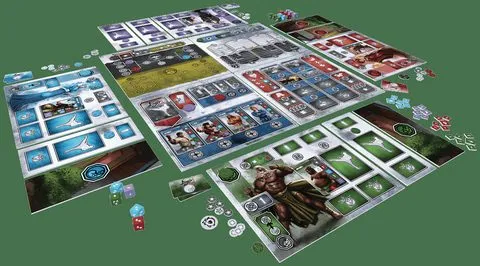 | Four Dojo boards, eight Dojo Expansion boards, four Village boards, Tournament board, Combat board, Sensei Activities board and Athlete Activities board. The pictured components help orient the setup; place the boards as shown on rulebook page 5. |
Cards
| Picture | Description |
|---|
 | Six Adventure cards: Season 1’s The Journey, The Bandits and Protect the Snake Dojo; Season 2’s The Great Journey, The Mighty Bandits and Protect the Mantis Dojo. Each states a Dan requirement and a cost or reward; satisfy the requirement before paying and taking its benefit. |
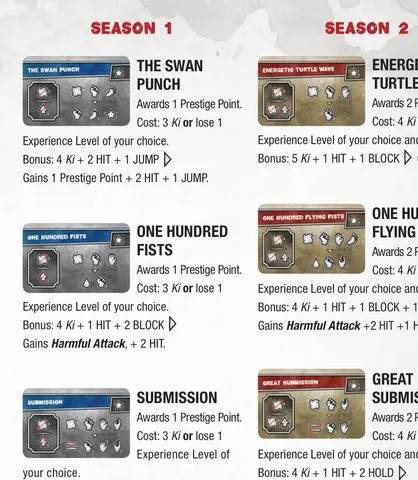 | Six Special Move faces are listed in the rulebook appendix. A move is assigned to the Athlete who learns it. Check its activation icons against that Athlete’s own combat roll; moves cannot chain from one another. FAQ |
| Each Dojo has one Senpai card, 12 Season 1 Athlete cards and 12 Season 2 Athlete cards. Their names, starting resources, discipline levels and abilities are listed in the rulebook’s Athlete references on pages 16–17. Individual current-edition fronts are not fully pictured in the public sources checked; see the gap note below. |
| Eight Prediction cards (two per Dojo color) are used to bet on tournament matches. The reward depends on the predicted result; follow the card and tournament rules when resolving a prediction. |
| Optional promo athletes Whitney and The Sheriff. Whitney starts a fight with three Jumps. The Sheriff automatically wins fights, cannot reserve a bracket space, must be sent first if used, earns no tournament PP, and prevents predictions in his matches. Promo rules |
Tiles
| Picture | Description |
|---|
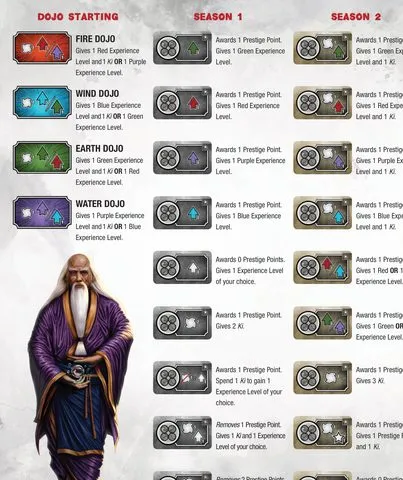 | The rulebook appendix shows the four starting Training Equipment tiles and Season 1 equipment faces. Equipment gives the listed training, Ki and Prestige benefits; athletes can use equipment in their own Dojo. |
| Season 2 Training Equipment provides its own mix of experience, Ki and PP benefits. Replace shared equipment only during the proper display refresh. |
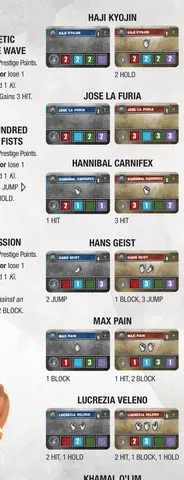 | Seven Void Dojo Athlete tiles fill vacant tournament bracket spaces, including in the official solo game. Their combat dice and special effects are shown in the rulebook appendix. |
| — | Three Reservation tiles determine tournament placement and first player; each Dojo may hold at most one Reservation. |
| — | Eight Dojo Expansion boards extend each player’s training area. Their four color-matched pairs are pictured in the component overview. |
Tokens & pieces
| Picture | Description |
|---|
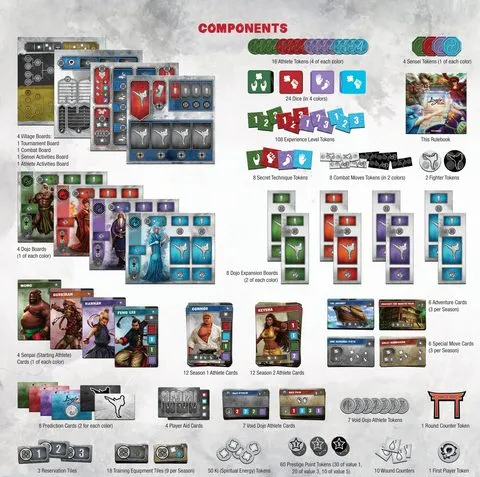 | Ki tokens belong to individual athletes; Experience tokens mark their four discipline levels; Wound counters reduce combat dice. The set also includes Prestige Point tokens, Secret Technique tokens, Athlete and Sensei markers, dice and round/first-player markers. |
Icons
| Picture | Description |
|---|
| Red, blue, green and purple show the four martial arts disciplines. Combat symbols show Hit, Block, Hold and Jump; rulebook examples explain how matching icons change a fight. |
| A crossed-out symbol prevents that result; colored number squares show an athlete’s discipline levels. Ki symbols rolled in combat are temporary and can activate moves, but do not become Ki tokens. |
The two promo fronts have only an angled BGG photo, so the promo values are transcribed from the rules and their faces remain unpictured. Individual reservation, prediction and expansion-board faces are not separately readable in the overview.